How to Manage Cloud Storage for SMBs
Master how to manage cloud storage securely and cost-effectively. A practical 2026 guide with steps for backup, policy, and optimization.

Master how to manage cloud storage securely and cost-effectively. A practical 2026 guide with steps for backup, policy, and optimization.

48% of surveyed Canadian businesses use cloud computing, yet only 36% of Canadian businesses reported being able to fully restore data and systems from backups. Managing cloud storage therefore requires more than choosing a provider. It requires active governance, tested recovery, cost controls, and a clear understanding of where data sits and who can access it.
That gap is familiar to anyone who has inherited a mid-market IT environment. Files are spread across Microsoft 365, Google Workspace, AWS, Azure, employee devices, collaboration tools, and forgotten test accounts. Storage expands without notice, access permissions remain unchanged after staff move roles, and backup dashboards show successful jobs without proving that a usable restore is possible.
This guide focuses on the operational work behind how to manage cloud storage effectively. The practical sequence is straightforward: audit what exists, classify it, secure it, back it up, monitor its cost, and verify its Canadian residency and sovereignty requirements.
Cloud storage became part of ordinary business operations faster than many organisations built the controls to manage it. Statistics Canada reported that 48% of surveyed Canadian businesses used cloud computing, making it the most commonly used ICT service among firms, as summarised in Canadian cloud computing and data sovereignty reporting. That adoption rate changes the management question. Storage is no longer a passive repository maintained by IT. It is part of how teams collaborate, deliver services, retain records, and recover from disruption.
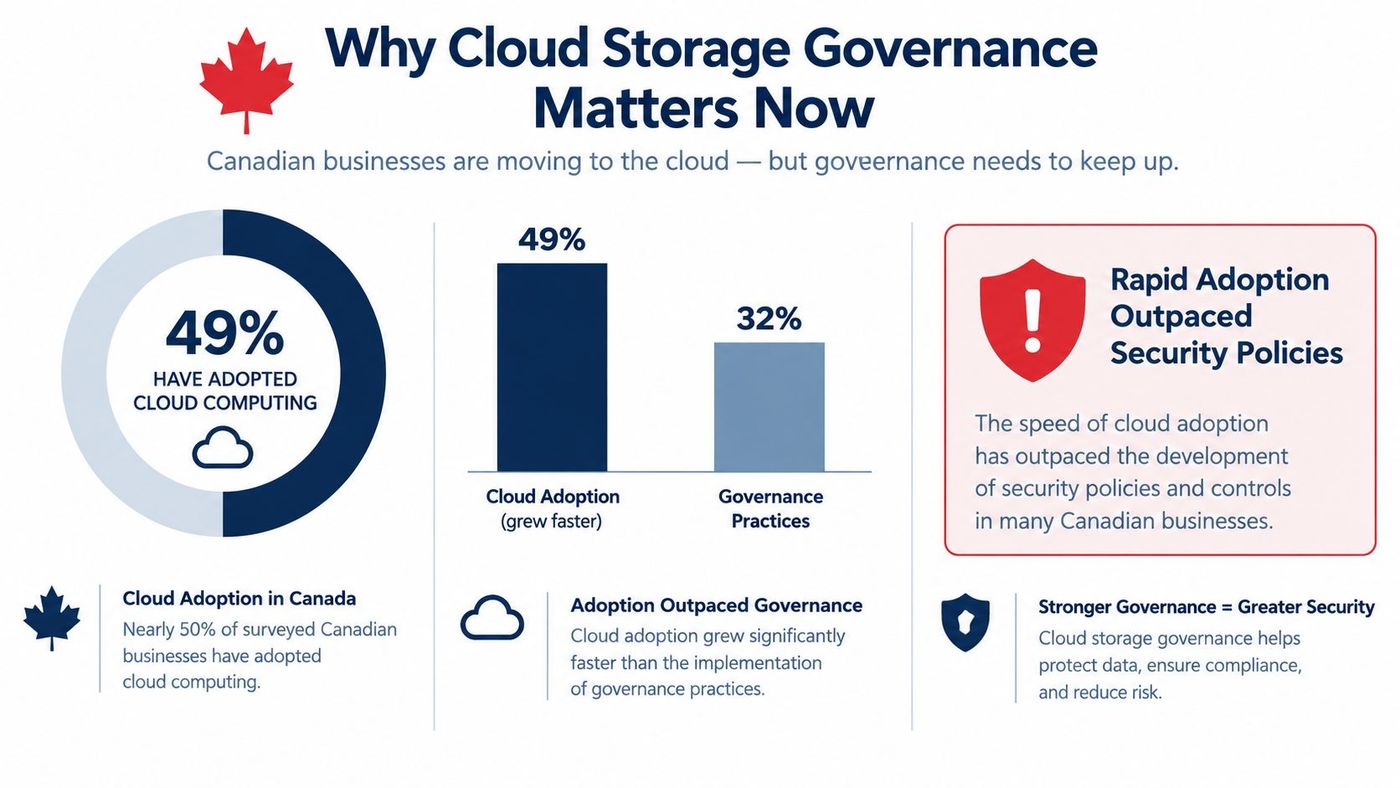
A growing storage estate creates several problems at once. Data sprawl makes it difficult to identify the authoritative version of a document. Unmanaged duplication inflates consumption. Broad sharing permissions increase exposure, while indefinite retention leaves unnecessary information available during an investigation, breach, or legal dispute.
The financial pressure is also real. MarketsandMarkets estimated the Canadian cloud storage market at $2.5388 billion in 2023 and projected it to reach $5.9998 billion by 2028, representing a projected compound annual growth rate of 18.8% in its Canada Cloud Storage Market analysis. For a medium-sized organisation, that growth translates into more services, more stored content, and more opportunities for poorly controlled consumption. A clear understanding of the real costs of cloud modernization helps leaders budget for governance rather than treating it as an afterthought.
Canadian businesses also need storage policies that support privacy and regulatory obligations, including PIPEDA and Quebec's Law 25, where applicable. The exact requirements depend on the organisation, the information involved, and the province or sector. Your governance policy should therefore define who owns data, how long it is retained, where it may be stored, and how access is reviewed. CloudOrbis' information governance guidance is a useful starting point for turning those principles into operating procedures.
You can't manage storage you can't see. Start with an inventory that covers every provider, tenant, subscription, workspace, bucket, shared drive, archive, backup vault, and business application that stores organisational data.
Assign an owner to each environment and record the account, business purpose, region, administrator, billing relationship, and backup arrangement. Include Microsoft 365 mailboxes and SharePoint sites, Google Workspace shared drives, AWS S3 buckets, Azure Blob Storage, SaaS platforms, and departmental tools purchased outside IT.
Export usage and access information where each platform supports it. Look for inactive accounts, public links, anonymous sharing, old project folders, duplicate media files, database exports, and backup copies that no longer have a business owner. Dark data appears here. It isn't necessarily malicious or useless, but nobody should pay for or protect information that nobody can explain.
A multi-site environment needs consistent naming and ownership rules. A practical multi-site data collection guide can help teams think through how information is gathered across locations before they apply the same storage assumptions everywhere.
Use a classification model that employees can apply without interpretation. Four categories are usually enough for a first pass:
Then add an access dimension. Mark each dataset as hot, warm, or cold based on how often the business needs it and how quickly it must be retrieved. That classification supports later decisions about storage tiers, archiving, recovery priorities, and deletion.
Finish the audit with a dependency review. A dataset may look unused while an application, reporting process, or legal hold still depends on it. Before deleting anything, confirm the owner, retention requirement, recovery value, and downstream connections. The CloudOrbis overview of cloud storage solutions for business provides useful context for comparing storage models against those operational needs.
Security settings should follow the classification and ownership decisions from the audit. Applying identical permissions to every folder is convenient, but it gives ordinary users more access than they need and makes investigations harder.
Require multi-factor authentication for administrators first, then extend it to every user and service account that supports it. Remove dormant accounts promptly, use groups instead of individual permissions wherever possible, and grant access through roles that match a person's job. A finance employee may need to edit financial records, while an external adviser may need time-limited access to a specific folder. Those aren't the same permission.
Review privileged access separately. Administrative accounts should be used for administration, not daily email and document work. Record who can create storage, change retention rules, disable logging, alter backup settings, or grant external access. Configure alerts for those actions and send the logs to a location that ordinary administrators can't alter.
Canadian cyber guidance recommends encrypting data at rest, including applications, virtual machine images, and backups. It also recommends security policies that require encryption, baseline configurations that enforce it, continuous monitoring, and strong key-management processes. The Government of Canada cloud security assessment guidance sets out those controls in more detail.
For sensitive workloads, confirm encryption in transit as well as at rest. Government of Canada cloud guidance says sensitive data used by government departments must be encrypted in transit, at rest, and in use, using approved cryptographic algorithms and protocols. It also requires departments to understand where data at rest is stored, as explained in the Microsoft 365 cloud security playbook. Private-sector organisations should use those controls as a strong benchmark, then align them with their own legal and contractual duties.
A retention schedule should name the record type, owner, required period, deletion trigger, exception process, and legal-hold procedure. Configure those rules in Microsoft Purview, Google Vault, AWS S3 Lifecycle, Azure Blob lifecycle management, or the equivalent platform control. Don't rely on a spreadsheet that nobody checks.
Retention isn't the same as backup. A retention rule manages the business record. A backup supports recovery. If administrators use backups as an uncontrolled archive, the organisation can keep sensitive information long after its operational purpose has ended. The CloudOrbis resource on cloud data protection offers a practical reference for connecting these controls.
A synchronised cloud folder isn't a backup. If ransomware encrypts the production copy, the synchronisation service may replicate the encrypted files. If a user deletes a folder, that deletion may propagate across connected systems. Recovery depends on an independent, usable copy and a documented process for retrieving it.
The Canadian Centre for Cyber Security recommends the 3-2-1 backup design:
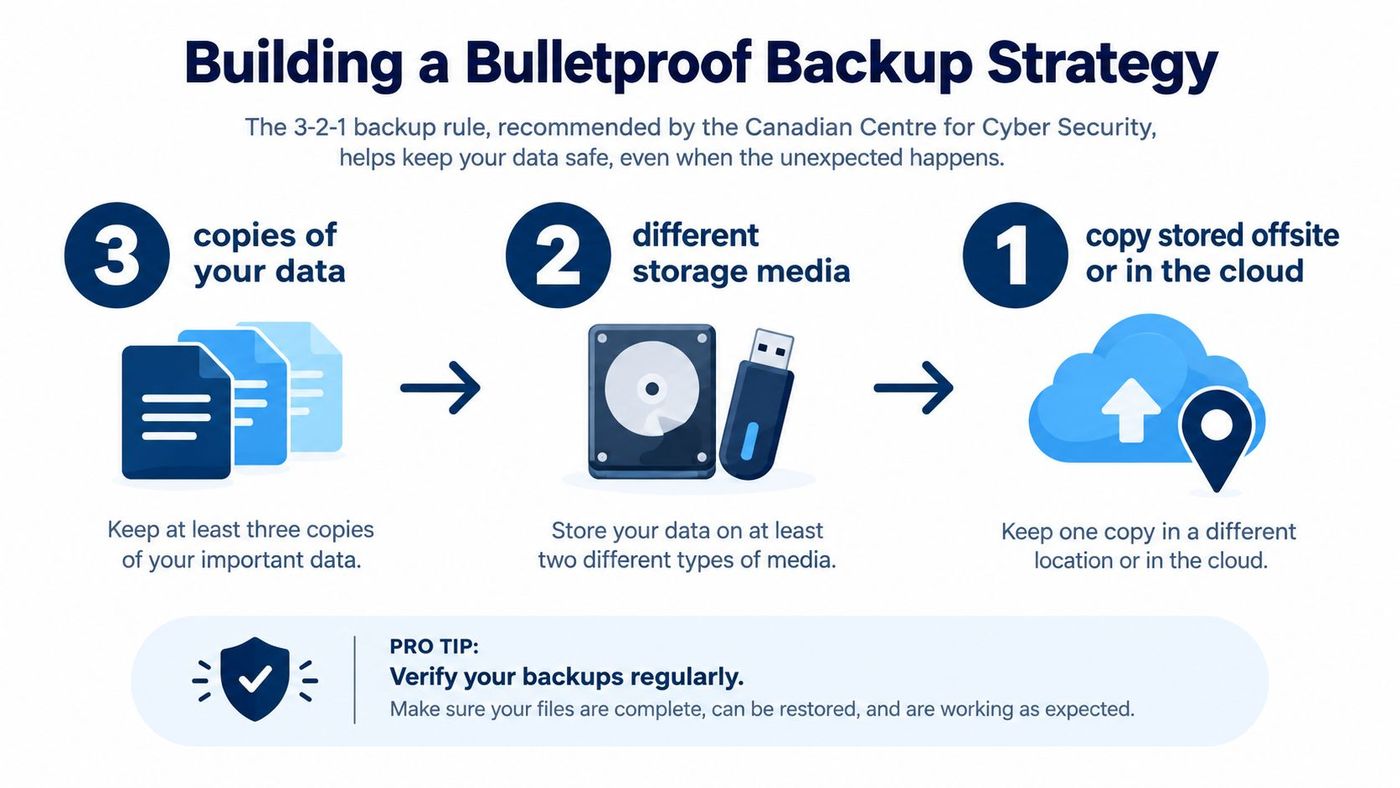
The Cyber Centre's backup guidance also recommends encrypting sensitive information and protecting separated cloud backups with a strong password or passphrase and MFA. Separation matters. A backup account with the same administrator credentials as production is not meaningfully independent when an attacker compromises that administrator.
List the systems the organisation must restore first. A clinic may prioritise patient scheduling and clinical records. A manufacturer may prioritise production planning, inventory, and customer orders. Set a recovery sequence, identify the people authorised to declare an incident, and document the provider contacts and credentials required for restoration.
Use immutable or otherwise protected backup options where the platform supports them. Review versioning, deletion protection, retention locks, and access logging. For virtualised environments, evaluate virtual machine backup solutions against application consistency, recovery speed, storage location, and the ability to restore to an isolated environment.
Practical rule: A green backup status proves that a job completed. It doesn't prove that the business can resume operations.
Schedule restore tests, not just backup jobs. Restore an individual file, a mailbox, a shared site, a database, and a complete workload where appropriate. Check that the restored data opens correctly, permissions remain appropriate, applications can use it, and the documented recovery time is realistic. Record the result, the person who performed the test, the errors found, and the corrective action.
The Canadian Centre for Cyber Security reports that ransomware incidents increased by an average of 26% per year from 2021 to 2024, which makes recovery testing a business control rather than a theoretical exercise, as described in its ransomware playbook. Use the CloudOrbis data backup and recovery strategies guide to structure restore priorities and test evidence.
Cloud storage bills rarely become difficult because one employee saved a document. They become difficult because nobody can connect consumption to a team, workload, retention rule, or access pattern.
Assign billing tags, cost centres, and owners to every bucket, container, project, and subscription. Review storage volume, object count, request activity, data transfer, version history, replication, and backup consumption. A cost dashboard that shows only the total invoice is too shallow to support decisions. Managers need to know which workload created the increase and whether that workload still needs the data.
Keep frequently accessed production content in a responsive tier. Move cold content to a lower-cost tier or archive when the retrieval delay and retrieval charges fit the business requirement. Use access logs and object age rather than guesswork. A file that looks old may support an active legal matter, while a recent export may already be disposable.
Lifecycle policies should automate predictable transitions. For example, a policy can move completed logs to an archive tier, expire temporary exports, and remove obsolete object versions after an approved period. Test lifecycle rules in a non-production location first. A poorly designed expiration rule can delete information that a team still needs.
Watch for the less obvious sources of waste:
The cheapest gigabyte is the one your policy prevents the organisation from storing indefinitely.
Set a monthly review with finance, IT, and workload owners. Require an explanation for material changes, approve exceptions to lifecycle rules, and track whether savings actions affect performance or recovery. The CloudOrbis cloud cost management resource can help teams connect monitoring with ongoing optimisation instead of treating cost review as an annual exercise.
“Stored in the cloud” doesn't automatically mean stored in Canada, controlled by a Canadian company, or protected from foreign legal access. Data residency describes where information is physically stored. Data sovereignty concerns the laws and jurisdiction that may apply because of the provider's ownership, control, operations, or access rights.
Canadian buyers need to ask both questions. A Canadian data centre may satisfy a location requirement while the provider's corporate structure creates exposure to a foreign jurisdiction. Recent Canadian survey reporting found that 78% of Canadians refused to have data hosted outside Canada, while independent research found that 88% of tools marketed with Canadian data residency remained exposed to foreign jurisdiction through corporate structure, as outlined in this Canadian data sovereignty survey.
Use a decision record for each sensitive workload:
The Government of Canada recommends assessing sovereignty, residency, and security risks before placing sensitive information in a public cloud. Its guidance also recommends that non-government organisations store sensitive data only in data centres within Canada's geographical boundaries. Geographic dispersal and replication still matter for continuity, but every replica must be included in the residency decision.
A practical plan doesn't need to begin with a platform migration. It begins with a controlled review of the environment already in use.
A mid-sized organisation might start by assigning owners to every storage location, separating confidential records from ordinary working files, and removing unused access. It can then protect administrator accounts with MFA, apply retention and lifecycle policies, establish independent backups, and run restore tests before changing more systems. The organisation should document its residency decision for each sensitive workload and review the evidence with legal, privacy, and business owners.
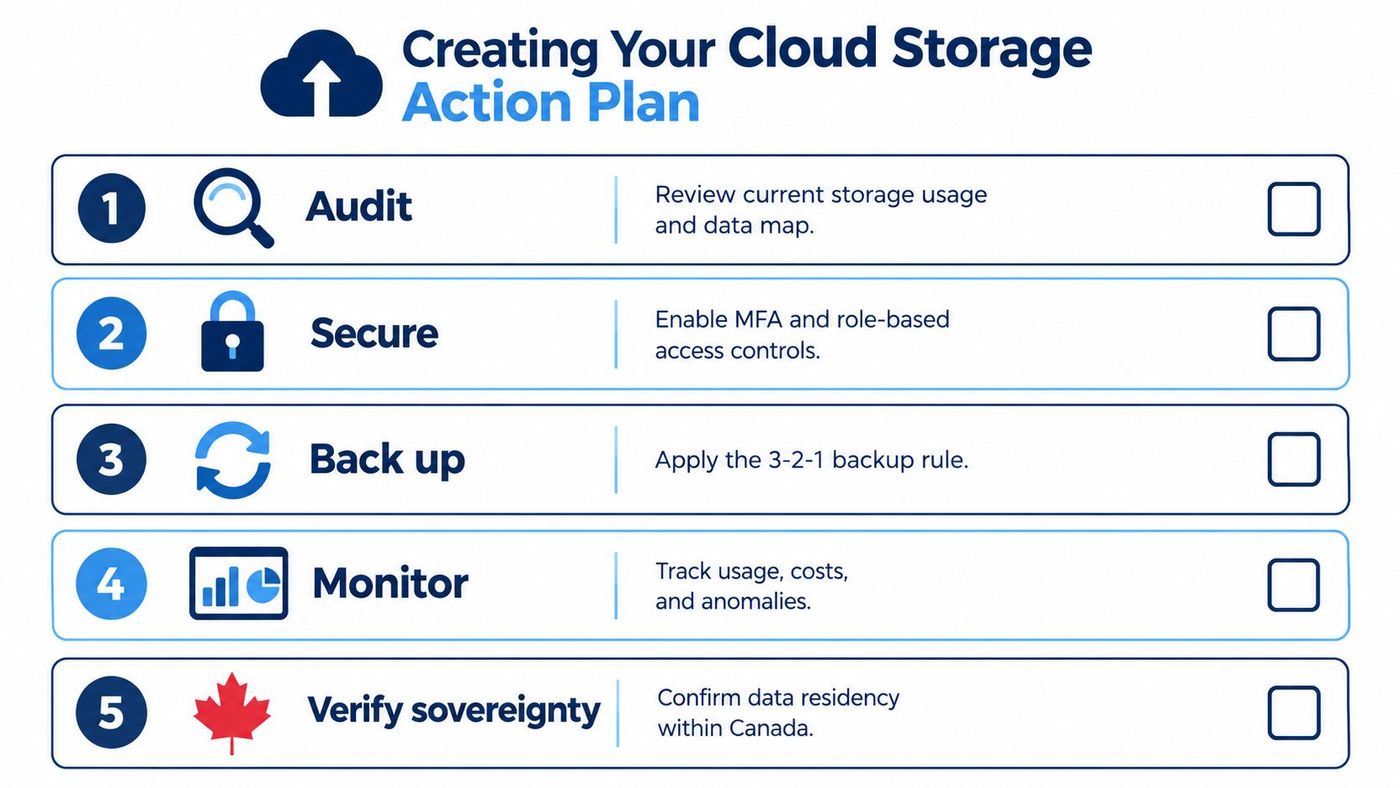
Use this checklist:
Cloud storage management is ongoing operational work. CloudOrbis Inc. offers managed cloud storage, backup and disaster recovery, cybersecurity, monitoring, and strategic IT support for Canadian small and mid-sized businesses. Visit CloudOrbis Inc. to discuss an audit and practical roadmap for securing, recovering, and controlling the cost of your existing cloud environment.
Book a 30-minute call with a senior engineer. No sales script, just straight answers about your environment.


