How to Build an IT Security Policy That Actually Works
Learn how to build an IT security policy that goes beyond templates. Practical steps, sample clauses, and compliance tips tailored for Canadian SMBs.

Learn how to build an IT security policy that goes beyond templates. Practical steps, sample clauses, and compliance tips tailored for Canadian SMBs.

It's 8:10 on a Monday morning at a Canadian healthcare clinic. The practice manager clicks a convincing Microsoft 365 message, enters her credentials, and moves on to the first patient appointment. Minutes later, the mailbox begins syncing to an unfamiliar phone. The manager doesn't know whether to disconnect the laptop, call the IT provider, reset her password, or preserve the message as evidence. The policy exists somewhere in a shared drive, but nobody can find it while the inbox and collaboration tools are under suspicion.
That's the difference between a policy that looks complete and an IT security policy that works in practice. A useful policy tells people what to do under pressure, assigns decision authority, and produces evidence that controls operate in real workflows. It also gives leadership a small set of metrics that reveal whether the organisation is becoming safer or merely collecting documents.
At 9:05, a staff member reports a suspicious Microsoft 365 sign-in. The policy says to report incidents, but not which channel to use if the mailbox may be compromised, who can disable access, or whether the device should remain powered on. That gap turns a manageable event into a leadership problem.
The Canadian maturity gap is clear. In 2023, only 26% of Canadian businesses with 10 or more employees had written cybersecurity policies, while 16% reported being impacted by a cybersecurity incident, and recovery spending doubled compared with 2021, according to Statistics Canada's cybersecurity findings. A policy that documents controls but gives no first-response decisions leaves staff guessing when technical safeguards fail.
Practical rule: If a non-technical employee cannot follow the policy while email, phones, and collaboration tools are unavailable, the document is unfinished.
Write the first fifteen minutes into the policy. The employee should use an independent reporting channel, record what happened, and avoid deleting messages or resetting devices without direction. The service desk or on-call lead logs the time, preserves relevant details, and decides whether to isolate access. The privacy owner, operations lead, and executive sponsor need clear triggers for joining the response. A 15/30/60-minute playbook makes those handoffs measurable instead of relying on memory.
The same discipline applies to routine changes. A clinic, accounting firm, or manufacturer needs an accountable owner, training records, exception tracking, and tested recovery steps, not a PDF stored in a folder. Use a documented change management process to introduce controls without driving staff toward workarounds. For supplementary reading, Agentable website security insights can help teams review practical website risks alongside their internal policy.
A useful policy records response times, overdue exceptions, training completion, and recovery-test results. Those measures show whether the document changes behaviour when pressure arrives.
Build the policy as an operating system for security, not as a writing project. Each stage should produce an artefact that someone can inspect, test, and update.
Document the organisation's systems, data, users, suppliers, remote-access paths, and existing safeguards. The baseline should name mandatory controls, including multi-factor authentication, unique accounts, least privilege, supported software versions, patch deadlines, encrypted backups, and incident-reporting channels.
Formal documentation remains uncommon. Statistics Canada reports that only 26% of Canadian businesses with 10 or more employees had written cybersecurity policies in 2023, signalling a major maturity gap. The deliverable is a control inventory showing what exists, who maintains it, and where evidence is stored.
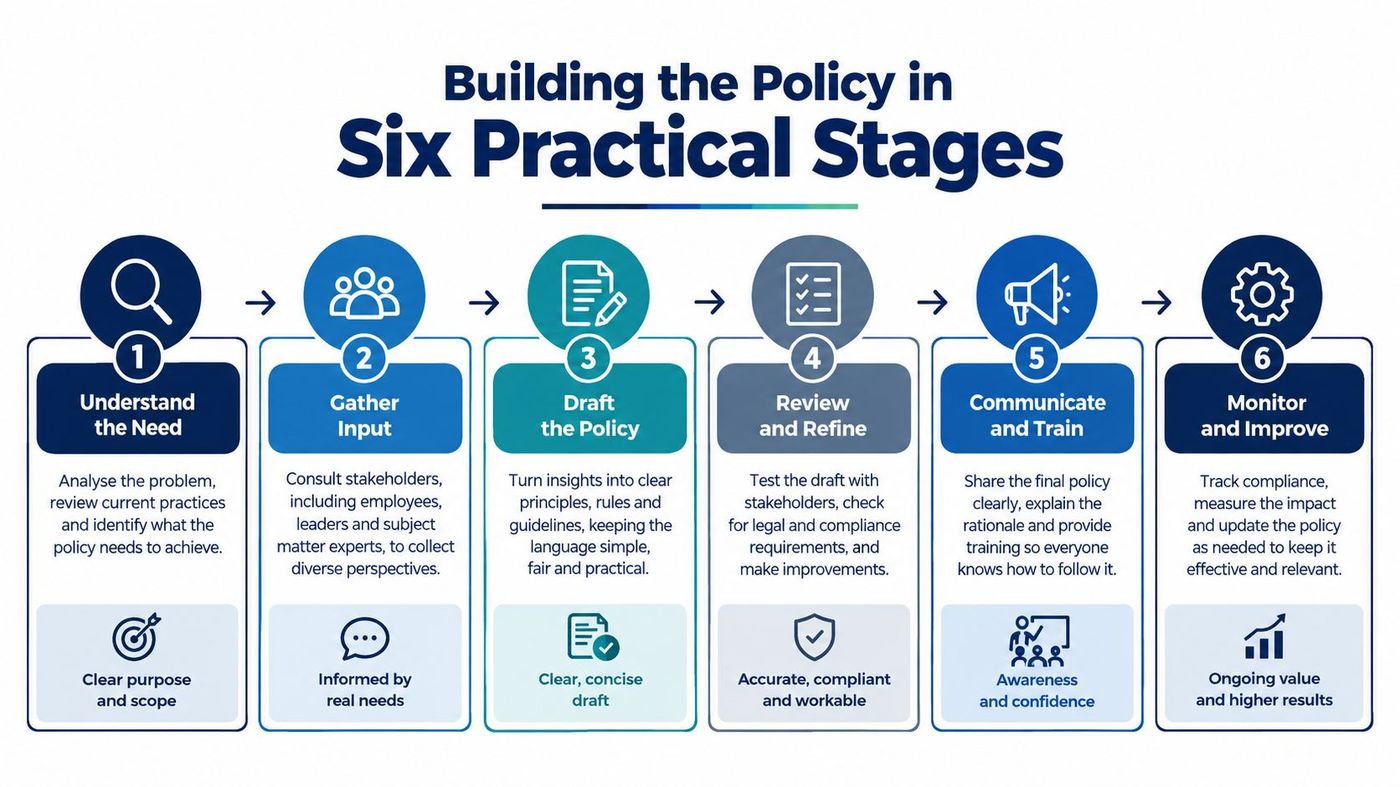
Create a risk register that scores likelihood and impact, then connect each material risk to a required control. A medical clinic may prioritise patient-system availability and privacy. A law firm may focus on privileged client files and secure remote access. A manufacturer may need to protect production-floor devices and supplier connections.
Use a practical risk management framework to keep the register tied to decisions rather than abstract threat labels. The deliverable is a prioritised list with treatment decisions, responsible owners, and accepted exceptions.
Name an executive sponsor, IT or security lead, privacy owner, operations lead, and department-level coordinators. Ownership must cover policy domains such as identity, endpoints, backups, vendors, incident response, and staff training.
An owner isn't merely the person who receives alerts. That person must have authority to approve containment, request evidence, escalate an incident, and close corrective actions.
Give staff rules that match their work. A receptionist needs a clear phishing-reporting route. A clinician needs instructions for lost devices and patient data. A finance employee needs stronger controls around payment changes and impersonation.
Record completion, failed simulations, repeat issues, and remediation. Training evidence should show whether behaviour changed, not merely whether a presentation was assigned.
Run tabletop exercises for phishing, ransomware, cloud-account compromise, and supplier access. Include a weekend or after-hours scenario, and test an outage in which email and Teams aren't available.
The deliverable is an exercise record containing decisions made, response times, missing contacts, evidence gaps, and corrective actions. If the team can't find the policy during the exercise, fix the distribution method.
Schedule a quarterly metrics review and an annual policy review. Track control coverage, unresolved exceptions, restoration results, incident reporting time, and training performance. The policy becomes credible when leadership sees the same measures repeatedly and funds the gaps they expose.
A template clause says, “Users must protect company information.” A defensible clause identifies the information, the required behaviour, the reporting deadline, the owner, the evidence, and the exception process.
Canadian organisations should also align their policy with PIPEDA, applicable provincial privacy requirements such as Quebec's Law 25, and sector obligations. Healthcare clinics, legal practices, finance teams, and manufacturers may face different contractual and regulatory expectations, so copying a generic acceptable-use document is a poor substitute for risk analysis.
Define approved devices, applications, cloud services, remote connections, and storage locations. Require unique accounts, prohibit shared credentials except where a documented technical exception exists, and apply least privilege to employees, administrators, contractors, and service accounts.
Require MFA for remote and privileged access. State who approves access, how access is reviewed, and what happens when an employee changes role or leaves.
Specify supported software versions, patch deadlines, vulnerability ownership, and escalation for overdue updates. A policy that says “keep systems current” gives nobody a measurable obligation.
Backups should be encrypted, access-controlled, monitored, and tested through restoration. Define recovery priorities for clinical, financial, legal, and production systems, then record failed tests and corrective dates.
Classify information in language employees understand, such as public, internal, confidential, and regulated. Identify patient health information, client legal files, financial records, employee information, and proprietary manufacturing data as sensitive categories requiring stronger handling.
Vendor clauses should cover access approval, MFA, logging, breach notification, data return or disposal, and the use of subcontractors. A supplier's security questionnaire doesn't replace internal ownership.
Under PIPEDA, an organisation must report a breach involving personal information to the Office of the Privacy Commissioner of Canada and notify affected individuals when it's reasonable to believe the breach creates a real risk of significant harm. The organisation must also record every breach of security safeguards involving personal information, including incidents that don't meet the reporting threshold, and retain those records for two years, as explained in the Canadian privacy breach guidance.
Turn that requirement into a workflow. The employee reports the event. The incident owner preserves facts and access logs. The privacy owner assesses harm. The executive sponsor approves communications. The record captures the affected information, people involved, decisions, notification rationale, and closure actions.
For a broader view of applicable obligations, organisations can use Canadian data privacy laws as a starting point. Every clause should also define annual review ownership, exception approval, expiry dates, and evidence requirements.
A suspicious message lands in a clinic inbox, a lawyer notices an unfamiliar login, or a plant supervisor sees systems behaving strangely. The first person who notices the event may have no technical training. The policy must give that person clear actions, a reporting route, and boundaries for what not to touch.
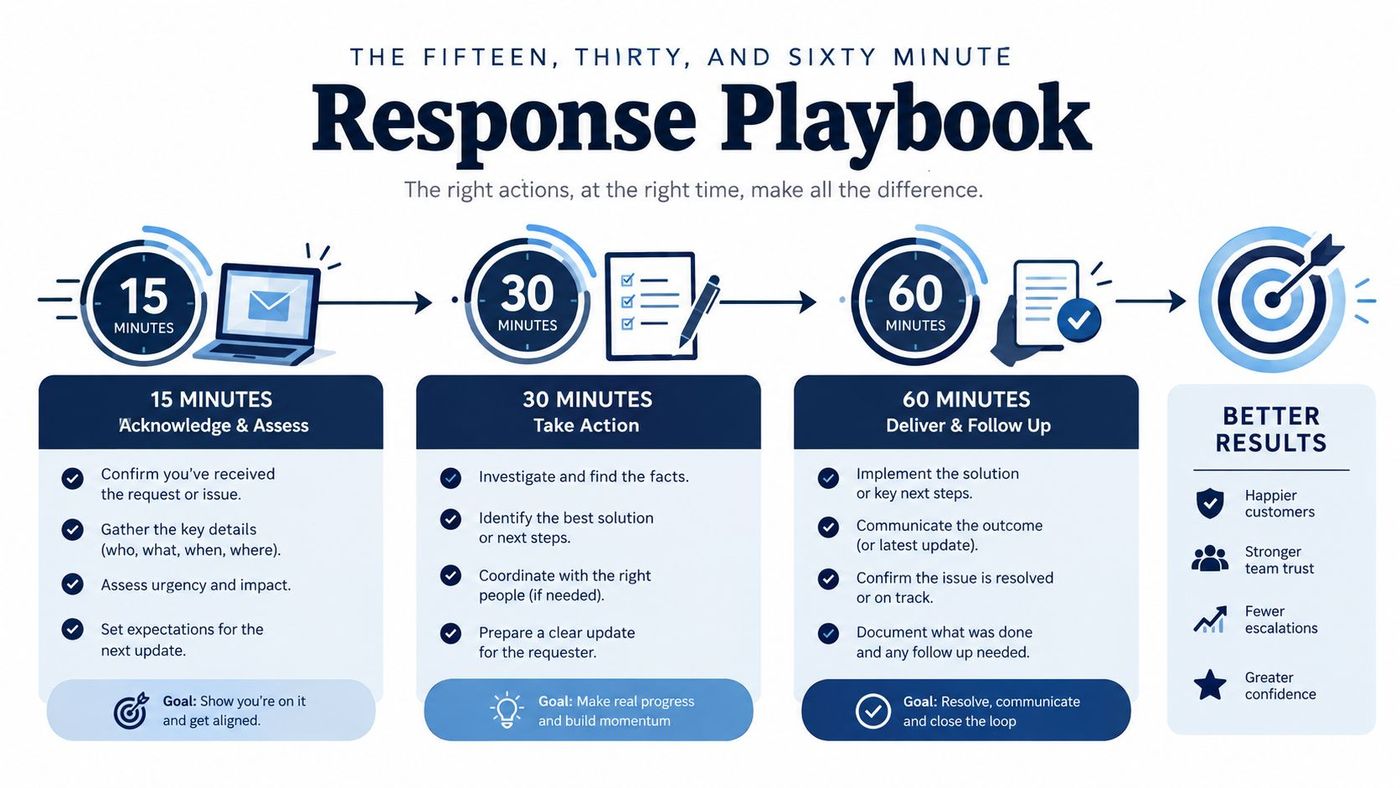
The employee stops interacting with the message or suspicious application, disconnects the affected device from networks if the policy directs that action, and leaves potential evidence intact. If the account may be compromised, the employee calls the incident channel through an offline contact method rather than relying on the affected account.
The service desk or on-call security lead records the time, user, device, message, clicked links, entered credentials, and visible symptoms. Alert the privacy owner immediately when personal information may be involved. The first report should be factual, not speculative.
The IT lead determines whether the event appears isolated or is spreading. The response team may disable sessions, reset credentials through a trusted administrative path, block known indicators, isolate devices, and preserve relevant logs. The executive sponsor decides whether operations should pause, while the privacy owner starts assessing potential harm.
For an identity-related compromise, inspect mailbox rules, forwarding settings, active sessions, mobile devices, and connected Microsoft 365 applications. Identity theft affected 31% of incidents affecting Canadian businesses in 2023, according to Statistics Canada's 2023 incident data. A stolen password requires investigation of persistence and access, not only a routine reset.
The incident owner creates a written timeline and assigns containment, communications, legal, privacy, and recovery tasks. The privacy owner assesses whether the PIPEDA threshold may be met. The executive sponsor approves communications with customers, employees, insurers, or regulators.
Use this decision matrix in the policy:
| Incident type | Primary owner | Immediate decision |
|---|---|---|
| Phishing with no confirmed access | IT lead | Preserve evidence, assess credentials and sessions |
| Credential or Microsoft 365 compromise | Security lead | Contain identity, review mailbox and application access |
| Ransomware or unavailable systems | Operations and IT leads | Protect safety, isolate systems, activate recovery priorities |
| Personal information exposure | Privacy owner | Assess real risk of significant harm and notification duties |
| Supplier-related compromise | Vendor owner and IT lead | Restrict supplier access and preserve contractual evidence |
A practical IT disaster recovery plan template can support the handoff from containment to service restoration. The response record must remain specific to the event, with evidence, decisions, owners, and timestamps captured as work proceeds. Schedule a post-incident review after recovery. Closing the ticket when systems return is not a review.
A blanket AI ban is easy to write and difficult to enforce. Employees can still paste sensitive information into unapproved services from personal devices, leaving the organisation with less visibility and no consistent response process.
The better approach is risk-tiered governance for Microsoft 365, Copilot, and other generative AI tools. A 2025 Insurance Bureau of Canada survey found that 72% of respondents were concerned AI and new technologies would make cyber risks harder to manage, while only 45% had policies and training to help employees identify AI-generated scams. The figures appear in the Insurance Bureau of Canada survey coverage.
Prohibit patient health information, client legal files, financial records, personal information, and proprietary manufacturing process information in unapproved AI tools. Require approved tenants, identity controls, logging, retention settings, and administrator review for sanctioned services.
Permit lower-risk uses, such as drafting generic internal content, only where employees verify the output and avoid confidential context. For high-impact decisions involving patients, clients, employees, finances, or safety, require human review and make the accountable decision-maker explicit.
The policy should say what happens if an employee pastes regulated data into an unapproved service. The employee must report it promptly. The IT lead contains access and preserves evidence. The privacy owner assesses the information, recipient, retention, and potential harm. The executive sponsor decides communications and corrective action.
For practical cloud-control considerations, ThreatExploit AI on cloud controls offers useful context for access, configuration, and monitoring discussions. CloudOrbis's AI governance framework can also help organisations structure these controls around existing Microsoft 365 identity, logging, retention, and training capabilities rather than purchasing a separate compliance programme.
Policy effectiveness should appear in system evidence, not employee attestations. A staff member can confirm that MFA is required, but only an identity-provider report can show whether remote and privileged accounts do in fact use it.
The federal Get Cyber Safe tracking survey reported 55% MFA use, 37% backup on all devices, 32% provision of cybersecurity best-practices training, and only 33% of small-business owners and managers saying their company had a cybersecurity policy for employees. Those figures are summarised in the federal cybersecurity tracking survey, and they show why stated controls need operational verification.
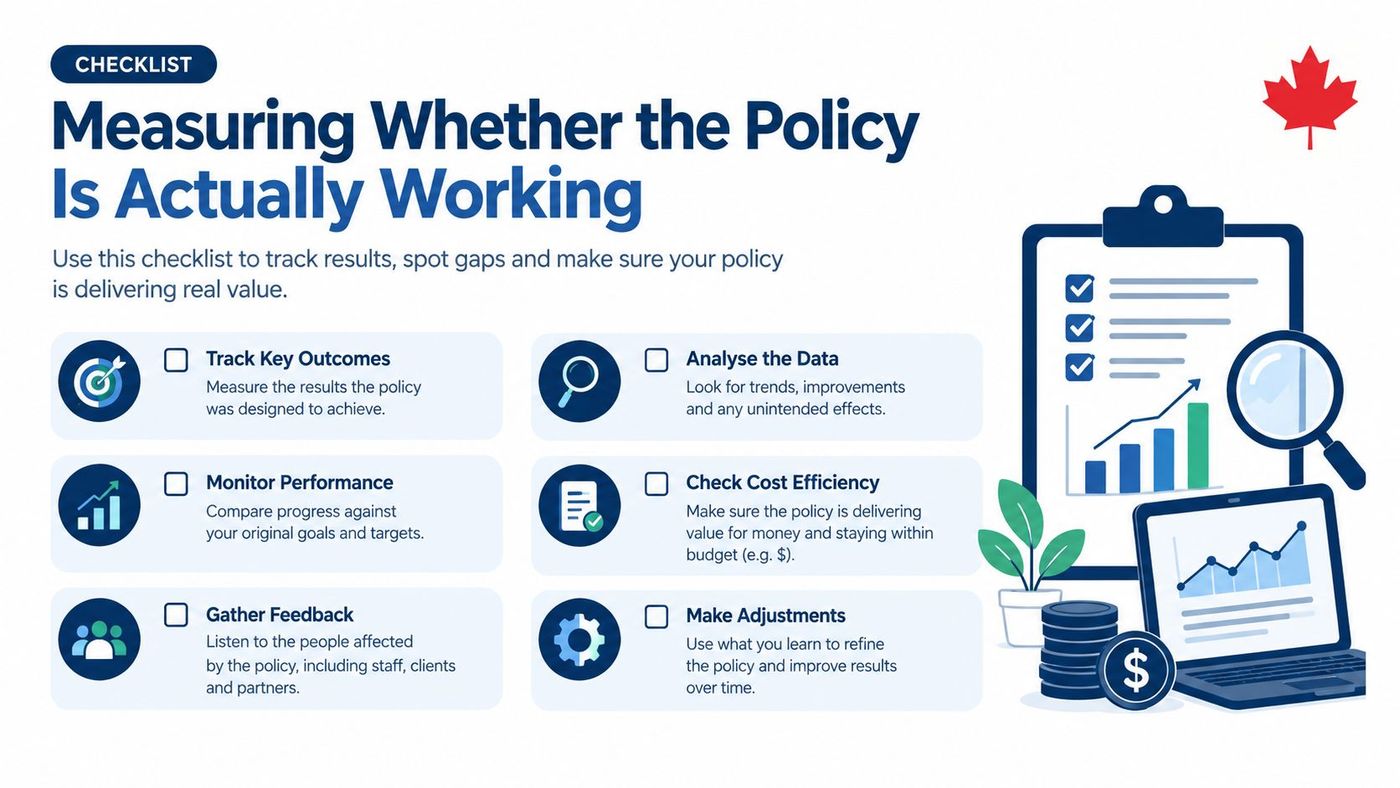
Use a scorecard with clear owners and evidence sources:
Review the scorecard quarterly. Bring unresolved gaps to the executive sponsor and use the annual policy review to change clauses, controls, training, or funding. This record also gives insurers and auditors evidence that the organisation manages risk continuously.
An IT security policy becomes durable when review is a scheduled management activity. The IT lead refreshes the system inventory and risk register. The privacy officer reviews breach procedures and retention rules. The operations lead validates recovery priorities. The executive sponsor reviews the scorecard, unresolved exceptions, and resource decisions.
Every exception should carry a named owner, an expiry date, a compensating control, and a closure note. Review the policy clause by clause, run a phishing or tabletop exercise, test backup restoration, and confirm that offline contacts still work.
The Office of the Privacy Commissioner of Canada recommends an oversight and review plan conducted annually, along with a designated person and procedure for managing privacy breaches, as set out in its privacy-management guidance. That cadence turns security documentation into a continuously improving programme.
CloudOrbis supports Canadian organisations with policy development, cybersecurity controls, Microsoft 365 governance, backup and recovery, employee training, and ongoing optimisation across healthcare, legal, finance, manufacturing, logistics, construction, Toronto, Calgary, Edmonton, and Oakville. If your policy is difficult to find or impossible to follow during an incident, visit CloudOrbis Inc. to discuss turning it into a tested, measurable operating process.
Book a 30-minute call with a senior engineer. No sales script, just straight answers about your environment.


