How to Outsource IT Service the Right Way
Learn how to outsource IT service the right way for your Canadian SMB. Compare models, vet providers, and avoid common risks with this practical guide.

Learn how to outsource IT service the right way for your Canadian SMB. Compare models, vet providers, and avoid common risks with this practical guide.

Your operations lead is chasing a failed backup, employees can't access shared files, and the person who knows the network is on holiday. You're ready to outsource IT service delivery, but the proposals all promise proactive support, stronger security, and predictable costs. None makes it particularly clear who's accountable when something goes wrong.
That's the buying problem. Don't start by comparing helpdesk prices. Start by deciding what the provider must prove about your business's resilience, security, and ability to keep working.
The moment to seek outside help often arrives when an owner realises that internal IT has become a collection of favours. An employee resets passwords between other responsibilities. A consultant knows the servers. Nobody owns the whole environment.
That arrangement might feel economical until you ask who handles a security alert while the consultant is unavailable. Outsourcing should replace that uncertainty with defined responsibility, not give everyone another phone number.
Canadian businesses already use external expertise extensively. Statistics Canada reported that 52.2% of businesses outsourced work during the preceding year, while 17.0% outsourced website development, software development, or programming in its first-quarter 2025 findings. Those categories demonstrate adoption, but shouldn't be confused with a measure of managed IT usage (Statistics Canada outsourcing findings).
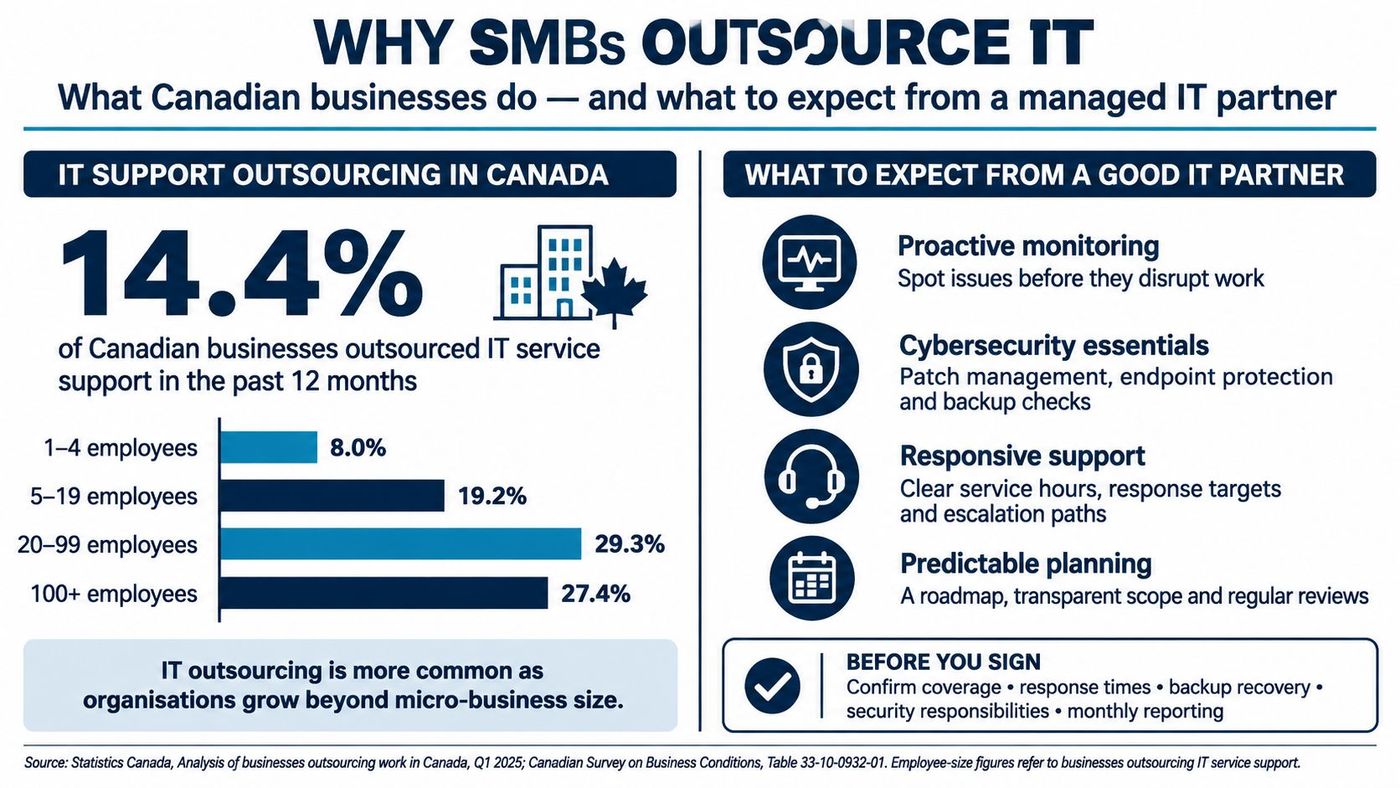
Cybersecurity, hybrid work, cloud subscriptions, and privacy obligations create overlapping responsibilities. Your business needs someone to coordinate them, particularly where application vendors, internet providers, and internal staff each control part of the environment.
Set expectations around business outcomes:
Outsourcing transfers work. It doesn't transfer your responsibility to ask whether that work is effective.
A credible provider should also tell you what it won't own. Unsupported applications, ageing equipment, and business decisions about acceptable downtime need explicit treatment. If those boundaries remain vague, you haven't bought accountability. You've bought a future disagreement.
Choose the operating model before comparing proposals. Fully managed, co-managed, and break/fix support solve different problems, and the wrong arrangement can leave capable people working against each other.
Fully managed IT is a retainer arrangement. You assign day-to-day technology operations to an external team within an agreed scope. For a professional services firm without dedicated IT staff, that can provide clearer ownership across support, devices, suppliers, and security.
Co-managed IT is a shared cockpit. Your internal team keeps defined responsibilities while the provider supplies agreed capacity or specialisms. A manufacturer might retain application and production-system knowledge internally while outsourcing endpoint protection, service desk coverage, and infrastructure maintenance.
Break/fix is an on-call mechanic. You request assistance when something fails or a project arises. It can suit isolated technical tasks, but don't treat it as continuous operational ownership. A small clinic still needs someone responsible for prevention and recovery, even if its support requests are infrequent.
| Model | Main trade-off |
|---|---|
| Fully managed | Broader external ownership, with a greater need for clear oversight |
| Co-managed | More internal control, with more coordination between teams |
| Break/fix | Narrow purchasing commitments, with more responsibility retained internally |
The comparison of break/fix and managed services can help you distinguish ongoing responsibility from incident-based assistance.
Ask how the provider bills, but don't mistake billing for proof. A monthly per-user fee isn't automatically managed service, and hourly project work doesn't invalidate an otherwise sound arrangement. Ask what preventive work happens without opening a ticket, who checks completion, and what the report contains.
Cloud purchasing is a separate classification from support ownership. Keep that distinction clear when reviewing the following cloud-model diagram.
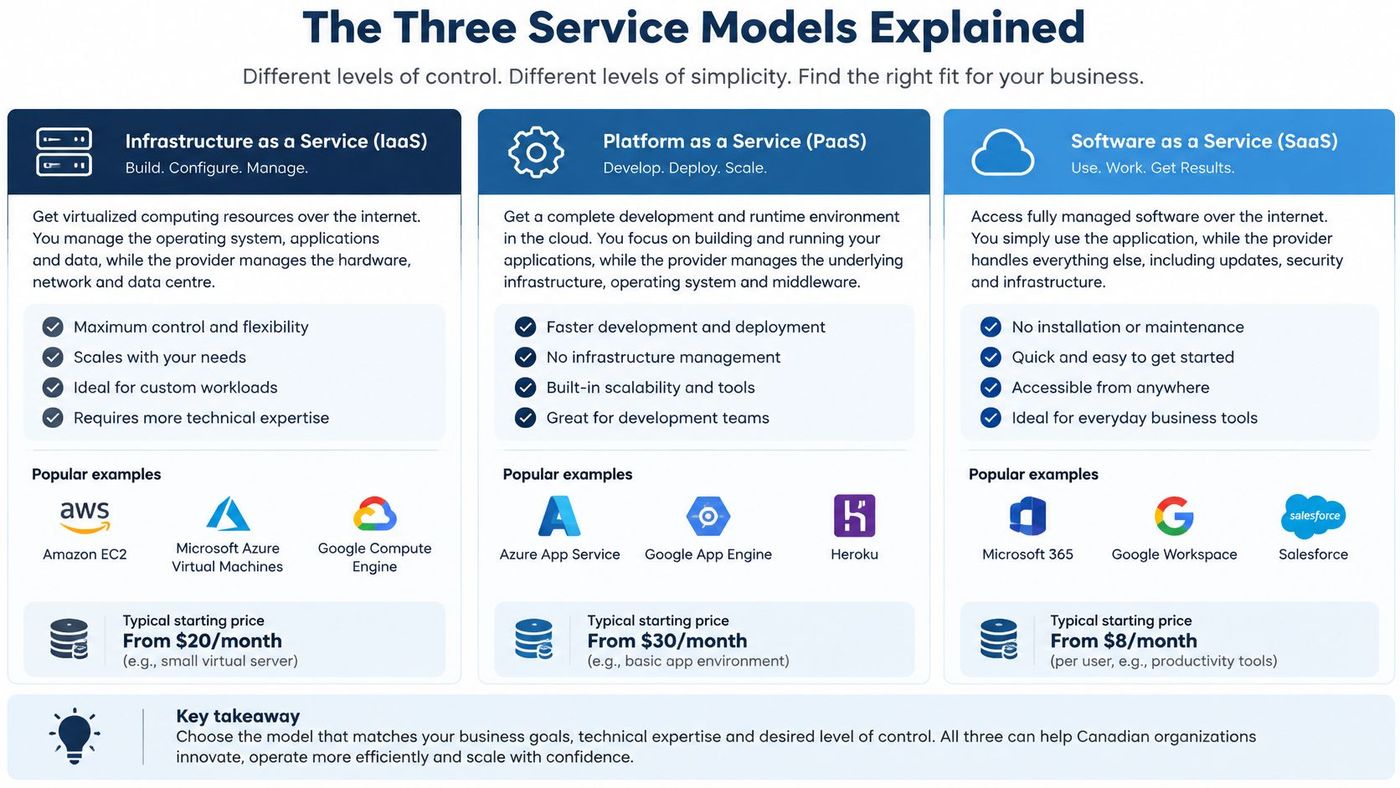
A defensible business case doesn't promise that outsourcing will make IT cheaper. It explains which capabilities you're buying, what internal effort they replace, and how you'll judge the result.
Budget predictability comes from a complete scope, not an attractive headline fee. Ask the provider to separate recurring support, software subscriptions, project labour, hardware, and after-hours charges. Your finance lead should be able to explain why an invoice changed without reconstructing a sales conversation.
Operational coverage matters when employees aren't working on the same schedule. Require the provider to distinguish continuous monitoring from staffed response. An alert generated overnight has limited value if nobody is authorised to investigate it until the next business day.
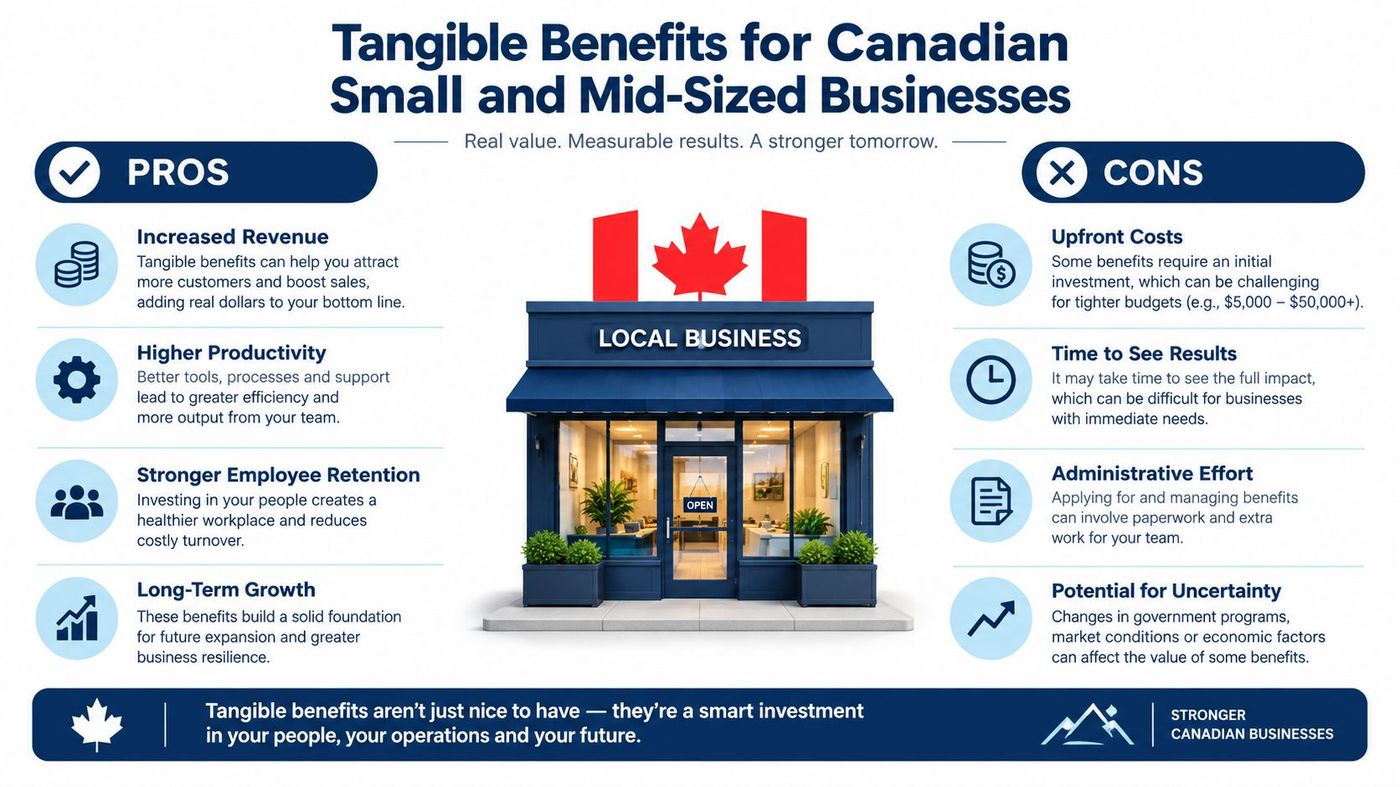
Use the following measures to assess the benefits of managed IT services, rather than assuming every contract delivers them.
Security deserves particular scrutiny. The Canadian Centre for Cyber Security reports that ransomware incidents grew by an average of 26% annually from 2021 through 2024, while approximately 22% of businesses provided formal cybersecurity training to non-IT workers (Canadian ransomware threat outlook).
For healthcare, legal, and finance leaders, make compliance support a defined deliverable. Ask providers to demonstrate how their proposed work addresses your requirements, including PIPEDA, Quebec's Law 25, or HIPAA-style safeguards where relevant. Don't accept a compliance logo as a substitute for a scoped responsibility.
An outsourced provider can create false assurance. A tidy dashboard and a responsive helpdesk don't establish that your business could withstand an attack or recover from one.
The perception gap is substantial. BDC reports that 73% of surveyed small businesses experienced a cybersecurity incident; its discussion also cites Insurance Bureau of Canada findings that 48% of SME respondents considered themselves vulnerable, 48% had implemented cyber defences, and 34% had tested their security measures (BDC on small-business cyber preparedness).
Those are separate survey findings, not interchangeable measures. The purchasing lesson is straightforward: confidence needs testing.

Practical rule: If a safeguard exists only in a salesperson's explanation, treat it as unresolved.
Another risk is divided responsibility. Your provider may assume an application vendor handles backups while that vendor assumes you do. Maintain a responsibility register covering systems, suppliers, and exclusions, then revisit it when the environment changes.
Use third-party risk management to assess the provider and its dependencies, not just its technical tools. The hardest outsourcing failures to unwind can be governance failures: nobody had clear authority, nobody verified the handoff, or nobody knew which assumption was wrong.
A polished proposal tells you how a provider sells. A sample report, onboarding plan, and escalation record tell you more about how it operates.
Evaluate finalists against the same evidence requirements. TekRecruiter's resource on how to evaluate tech vendors offers additional context for organising the selection process; for managed IT, insist on operational proof rather than broad capability statements.
| Criterion | What good looks like | Where providers usually fall short |
|---|---|---|
| Canadian support coverage | Verifiable Canadian-based coverage, with clear after-hours staffing and escalation | Monitoring is described as equivalent to a staffed helpdesk |
| Technical depth | Named expertise across managed IT, cybersecurity, cloud, and Microsoft 365 | Broad service claims without accessible specialists |
| Onboarding method | Written discovery, dependency, cutover, acceptance, and rollback procedures | Tool installation is treated as completed onboarding |
| Sector references | Reference customers willing to discuss relevant operating constraints | Testimonials reveal little about comparable environments |
| Pricing transparency | Clear per-user or per-device scope, exclusions, and change rules | Low recurring fees obscure mandatory extras |
| Security and insurance evidence | Reviewable security practices, relevant evidence, and broker-verifiable coverage | Badges and policy summaries replace meaningful review |
| Account management | Named contacts, scheduled reviews, action tracking, and escalation ownership | Meetings focus on ticket totals and renewal discussions |
Don't demand identical delivery methods from every finalist. A co-managed provider should demonstrate how it collaborates with internal staff; a fully managed provider should demonstrate broader operational ownership. Judge each against the responsibilities you intend to assign.
Ask references what happened during a difficult incident or disputed scope decision. Did the provider coordinate the work, explain the business impact, and close the follow-up actions? Those answers are more useful than a general satisfaction rating.
Request a redacted monthly report before signing. Look for unresolved exceptions, overdue actions, accountable owners, and changes in exposure, not just colourful charts.
Finally, ask the proposed account manager to explain an adverse result in the sample report. You're assessing whether that person can distinguish technical activity from business risk, and whether they'll give you an uncomfortable answer when you need one.
Your contract should describe what happens under pressure. Marketing language such as priority support or enterprise-grade protection doesn't tell your operations lead what to expect during an outage.
Start with response, investigation, containment, and restoration as distinct commitments. Define incident severity by business impact, identify when each clock starts, and state how escalation works when a commitment is missed.
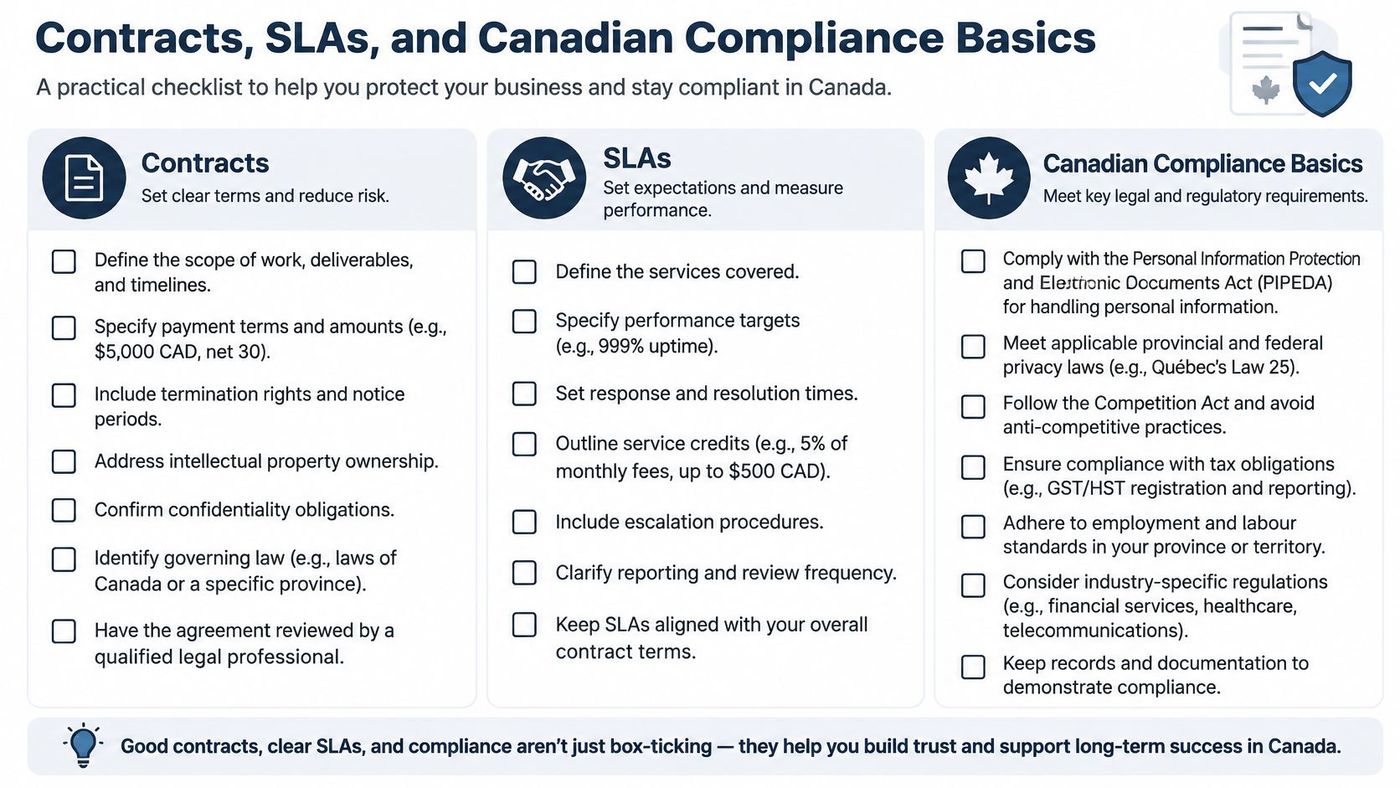
The Canadian Cyber Centre recommends starting with an incident-response plan, operating-system and application patching, strong authentication, and data backup with encryption (Cyber Centre guidance for small businesses). Translate those controls into assigned tasks, deadlines, exceptions, and evidence.
For recovery, distinguish the recovery-point objective, how much recent data loss you can tolerate, from the recovery-time objective, how long restoration may take. Define both by workload rather than applying a universal promise.
The Cyber Centre recommends multiple backup locations, including at least two offline or network-inaccessible copies, a separate cloud copy, and regular restoration testing; it warns that ransomware can locate and delete online backups (Canadian ransomware recovery playbook). Require demonstrated recovery, not merely successful backup-job notifications.
Under PIPEDA, organisations must report qualifying breaches to the Privacy Commissioner and notify affected individuals where there is a real risk of significant harm. They must also retain records of every safeguards breach for two years, including those below the reporting threshold (Privacy Commissioner breach guidance).
Require prompt provider notification, evidence preservation, and assistance with your assessment. Have counsel review applicable provincial requirements, including Quebec's Law 25, alongside Canadian data privacy laws.
The commercial schedule should also specify:
The lowest quote isn't meaningful until you've priced what it leaves out.
Treat the following as a proposed transition schedule, not a promise that every environment should move at the same speed. Critical applications, incomplete records, and an uncooperative outgoing supplier can all justify changing the sequence.
Don't cancel existing coverage until the incoming provider demonstrates readiness. Agree on acceptance criteria and rollback authority before changing production systems.
Keep a shared transition register with an owner for each unresolved item. A missing administrator account is a cutover dependency, not an administrative detail to tidy up later.
Keep internal IT involved. Your employees know the awkward production dependency, unusual billing workflow, and undocumented workaround that an incoming provider hasn't discovered yet. Preserve that institutional knowledge.
During weeks three through six, stage remote monitoring and management, endpoint detection and response, multifactor authentication, and backup tooling. Test compatibility before replacing existing security agents, and document how to reverse a failed change.
Use weeks seven and eight for focused employee communication and training. Announce the new support route before changing access processes; explain what employees should expect and how to recognise legitimate provider communications.
For the remaining transition period, validate monitoring coverage, resolve outstanding ownership questions, and test the agreed escalation path. Hold the first formal review by day 90, using the accepted scope and unresolved register rather than a presentation announcing that onboarding is complete.
Apply a documented change management process throughout. A technically correct deployment can still create avoidable disruption if employees, application owners, and suppliers don't know what's changing.
Use your next quarterly review to examine evidence, not reassurance. Ask the provider to supply the supporting records in advance so the meeting produces decisions instead of promises to investigate.
Record the decision, owner, and completion date for every unresolved issue. If leadership accepts a risk rather than funding remediation, document that choice explicitly.
The right provider won't promise that nothing will fail. It will explain what it controls, show where weaknesses remain, and accept scrutiny when delivery falls short. The buying question isn't what the service costs. It's what evidence you'll receive that the business is better protected.
CloudOrbis Inc. offers managed and co-managed IT, cybersecurity, cloud services, backup and disaster recovery, and vCIO support for Canadian businesses. Visit CloudOrbis Inc. to book a no-pressure IT assessment focused on your current evidence gaps, provider responsibilities, and measurable priorities for your next quarterly review.
Book a 30-minute call with a senior engineer. No sales script, just straight answers about your environment.


