Strategic IT Management for Canadian SMBs
Strategic IT management explained for Canadian SMBs. Learn frameworks, governance, KPIs, and how to align IT with business goals in 2026.

Strategic IT management explained for Canadian SMBs. Learn frameworks, governance, KPIs, and how to align IT with business goals in 2026.
Recovery is getting more expensive while prevention is getting less attention in Canada, and that gap explains why so many small and mid-sized businesses feel busy with technology but still exposed. Strategic IT management closes the gap. It turns scattered purchases, renewals, and support tickets into funded decisions tied to revenue, risk, and continuity.
Cloud is no longer a pilot project for most Canadian firms. Statistics Canada's Survey of Digital Technology and Internet Use found that 48% of Canadian businesses used cloud computing in 2023, a 3-percentage-point increase from 2021, with information and cultural industries leading at 81%.
That spread matters. A clinic, a manufacturer, and a creative agency don't carry the same data, downtime tolerance, or compliance duties, so they shouldn't copy the same cloud plan.
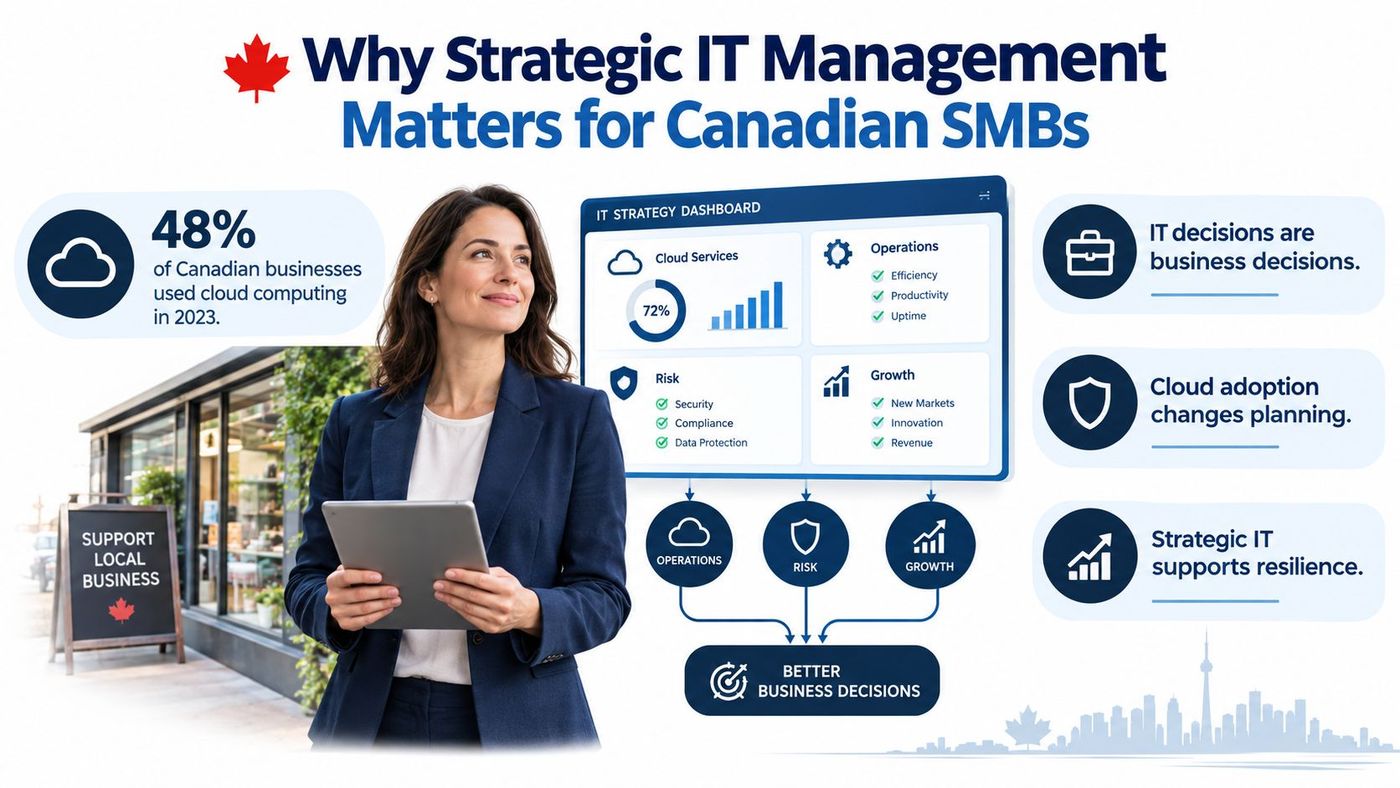
Once email, files, finance, and sector systems live in cloud services, every change touches identity, access, and recovery. Leaders have to decide who signs in from where, which data stays in Canada, how vendors connect, and what happens when a service fails.
Buying Microsoft 365 licencing doesn't answer those questions. Moving a file server doesn't answer them either. Those are purchases, not a strategy.
A strategy sequences the work. It sets priorities, weighs business risk, and measures whether operations improve after a migration.
Good records make those decisions auditable. Documented tickets, approvals, and changes show what was decided and why, much like clear audit trails in Autotask tickets help a service team trace work from request to resolution.
Cloud architecture, resilience, and cost control now belong at the board table because they shape how the business operates every day.
Most SMBs don't lack technology. They lack a plan that connects technology to the work that earns money, the risks that could stop it, and the recovery steps that restart it. A structured IT risk assessment for Canadian organisations gives leaders that starting point in business language, not a list of products.
For healthcare, manufacturing, logistics, professional services, and construction, the national adoption baseline carries a practical lesson. Your competitors, suppliers, and clients already depend on cloud systems. If your own environment grew by accident, you'll feel it first in slow onboarding, unclear permissions, surprise renewals, and weak recovery. Strategic IT management is how you regain control without slowing the business down.
Think of a delivery fleet. Keeping vehicles fuelled, serviced, and roadworthy is essential work, but it isn't the same as deciding which routes to run, which vehicles to replace, or whether a new depot makes sense. IT works the same way.
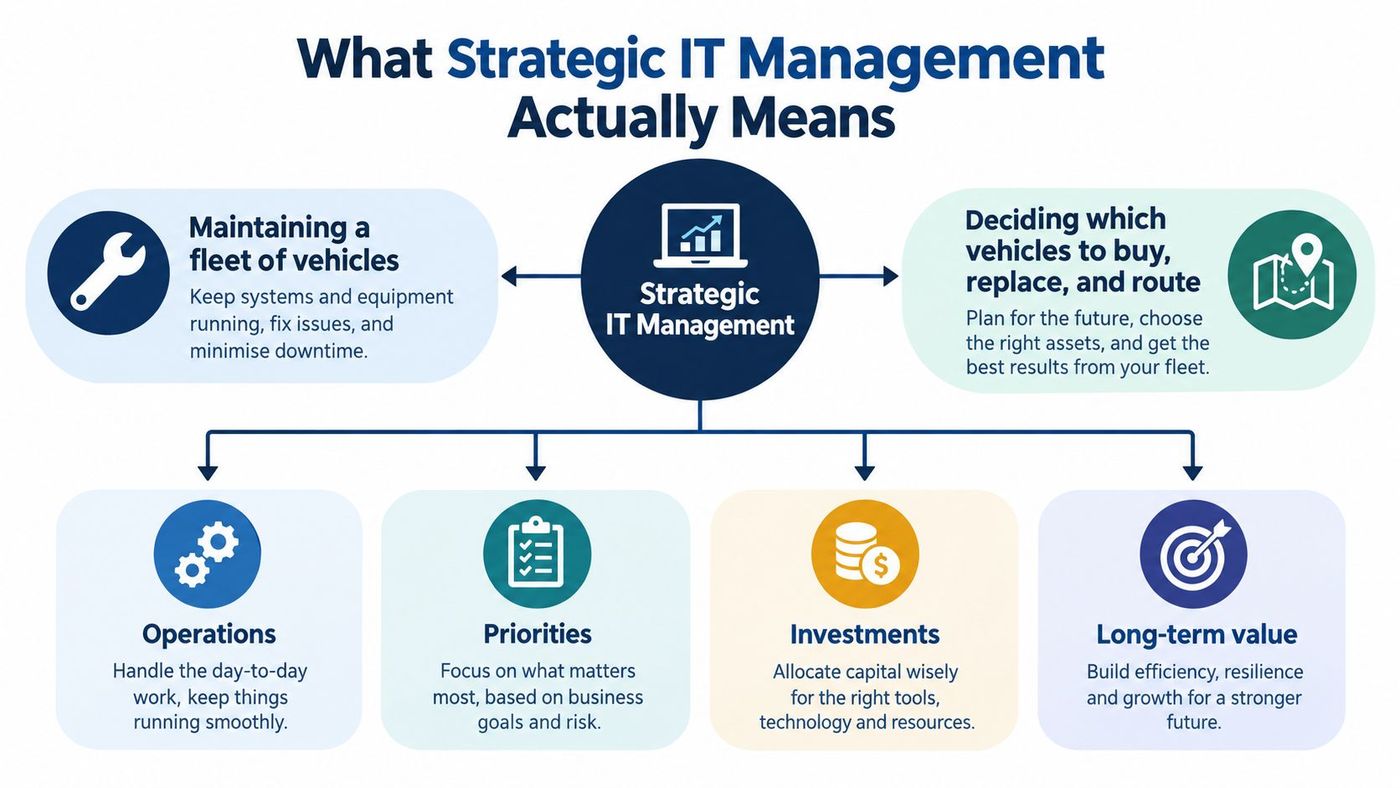
Many leaders blur three different layers together. When that happens, urgent support work crowds out planning, and planning, when it happens, drifts away from daily reality.
Strategy answers where IT should take the business. Examples include supporting a second location, shortening client onboarding, or giving field crews secure access to drawings and schedules.
Governance answers who decides. It covers who owns risk, who approves spending, which policies apply, and how exceptions get recorded and reviewed.
Operations keeps today's systems running. Monitoring, patching, backups, and helpdesk support live here, and they should follow priorities set by the first two layers.
Plain definition: Strategic IT management decides what technology should do for the business, who owns each decision, and how you'll prove it's working.
A vCIO, or virtual chief information officer, usually leads strategy and governance on a part time or consulting basis. A helpdesk or managed service team usually handles operations. A mid-sized firm needs both functions, even if one person wears two hats on some days.
Ask three questions about any proposed purchase. Which business outcome does it support? Who owns the risk if it fails or exposes data? How will operations run, patch, and recover it after go live?
If nobody can answer, you're looking at a product pitch, not a plan. If all three answers are clear, you can compare options on value, effort, and risk instead of features alone.
Take a common example. Replacing laptops is an operational task. Deciding that standardised laptops with disk encryption and automated setup will cut onboarding effort and reduce lost device risk is strategy. Approving the standard, the refresh cycle, and the disposal process is governance.
You should be able to explain the distinction to a colleague in one sentence. Operations keeps the fleet moving today. Strategy and governance decide where the fleet goes next, what it costs, and how much risk you're willing to carry.
Owners and finance leaders rarely fund IT because a tool looks impressive. They fund it when they can see uptime protected, staff time saved, audit questions answered, and spending made predictable.
Canadian incident data shows why that framing matters. Statistics Canada reported that approximately 16% of Canadian businesses were affected by cybersecurity incidents in 2023, and total spending on recovery doubled from approximately $600 million in 2021 to $1.2 billion in 2023, while the proportion spending on prevention or detection declined from 61% to 56%.
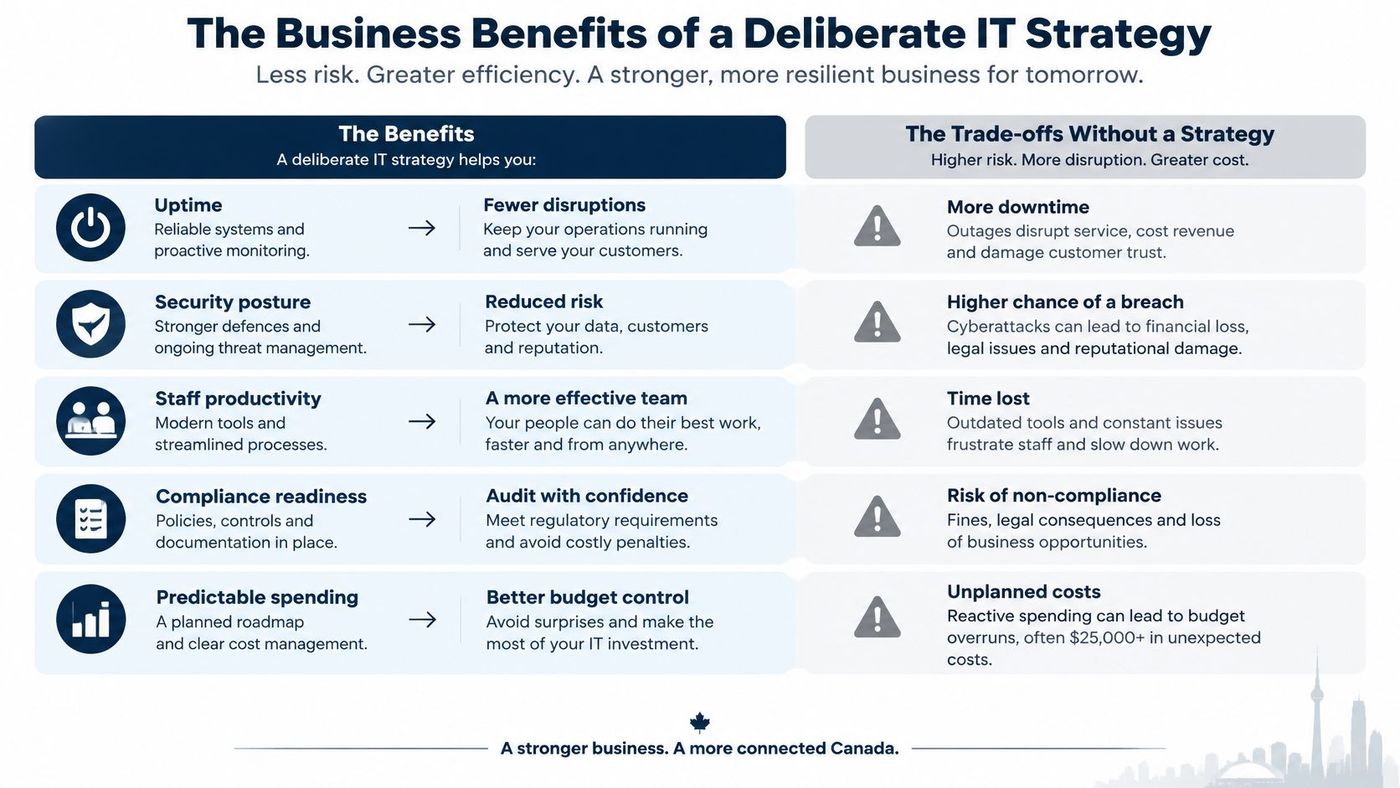
Recovery costs grew faster than preventive governance. Monitoring alone doesn't equal readiness, especially when written policies, tested backups, and clear incident roles are missing.
A deliberate strategy shifts spending earlier. You pay for identity controls, training, patching discipline, and restoration tests on a schedule you choose, instead of paying for emergency recovery on a schedule an attacker chooses.
Predictable spending is a benefit in its own right. A lifecycle plan spreads device refreshes, licence true ups, and network upgrades across quarters, so leaders aren't forced into rushed purchases after a failure. A clear cost benefit analysis approach for IT decisions helps you compare that planned spend against downtime, rework, and recovery exposure.
Strategy also helps you judge newer tools calmly. For example, AI sales assistance for small businesses may suit a firm that wants faster lead follow up, but only if customer data, permissions, and human review are settled first.
Don't treat IT as a cost centre that only reports tickets closed. Treat it as continuity insurance plus a productivity program. When leaders review security posture, recovery readiness, and staff experience together, they fund prevention because the business case is visible. That's the opposite of reactive management, where every incident becomes a surprise invoice and a scramble for decisions nobody made in advance.
A mid-sized Canadian firm needs governance it can run, document, and improve with its available staff. The right model resembles a well-marked route: it shows who decides, what gets reviewed, and when to escalate, without adding process for its own sake.
Start with basic ownership before pursuing certification. Canadian businesses face different requirements depending on their clients, contracts, and operations. A written governance model makes responsibilities and decisions easier to establish when a customer, insurer, or auditor asks how risks are managed.
A lightweight steering group meets quarterly with an executive sponsor, an internal IT lead, and someone from finance or operations. It reviews risks, approves projects, and checks whether expected benefits arrived. The direct cost is low, but the group needs consistent meetings and a named owner for follow-up.
Control frameworks give the group a shared set of practices. The NIST Cybersecurity Framework organises work around governing, identifying, protecting, detecting, responding, and recovering. CIS Controls offer a more prescriptive, prioritised set of technical safeguards, which can help a small team decide what to address first.
Practices drawn from ITIL can make change control, incident handling, and service requests more consistent. Use the parts that reduce confusion, such as standard changes and post-incident reviews. Skip paperwork that does not affect a decision.
A co-managed model divides responsibilities. Internal leaders keep ownership of risk and business priorities, while an external team can provide monitoring, vulnerability follow-up, access reviews, and documented recovery testing. This can suit a firm with capable internal staff but limited specialist depth or coverage.
| Model | Typical Cost | Internal Effort | Best Fit |
|---|---|---|---|
| Quarterly steering group only | Low direct cost | High discipline required | Smaller firms with a strong internal lead |
| NIST or CIS based governance | Moderate, mostly staff time | Moderate to high | Regulated or client audited organisations |
| ITIL informed service management | Moderate | Moderate | Firms with frequent change and support volume |
| Co-managed IT | Predictable recurring cost | Moderate, focused on decisions | Growing firms needing coverage and specialists |
Governance Models Compared for Canadian SMBs should be judged by fit, not prestige. A logistics firm with warehouse systems and driver devices may need firm change control. A professional practice handling sensitive client files may need access reviews and clear evidence for clients. The useful model is the one that addresses the risks your business carries.
Choose based on three factors: regulatory and contractual exposure, tolerable downtime for core systems, and staff capacity to maintain documentation, reviews, and testing. A risk management framework guide can help organise those responsibilities without copying an enterprise template.
Then put the arrangements in writing. Name the sponsor, meeting cadence, approval limits, policy owners, and escalation path. Governance works when it leads to timely decisions. If projects still start without risk review, simplify the process. A smaller set of controls, applied consistently and supported by evidence, is more useful than an ambitious model that exists only on paper.
Leaders fund what they can measure. A project status report or ticket count alone cannot show whether a business is reducing cyber risk or restoring services faster. Useful KPIs connect technology work to a decision, such as adding monitoring, fixing an old vulnerability, or testing recovery.
Canadian businesses face different levels of exposure as they grow. National figures cited earlier show that cybersecurity incidents affect small and medium-sized businesses at different rates. More staff, devices, cloud applications, suppliers, and remote access points also create more places to manage. Set measures that reflect the size and importance of your own operation.
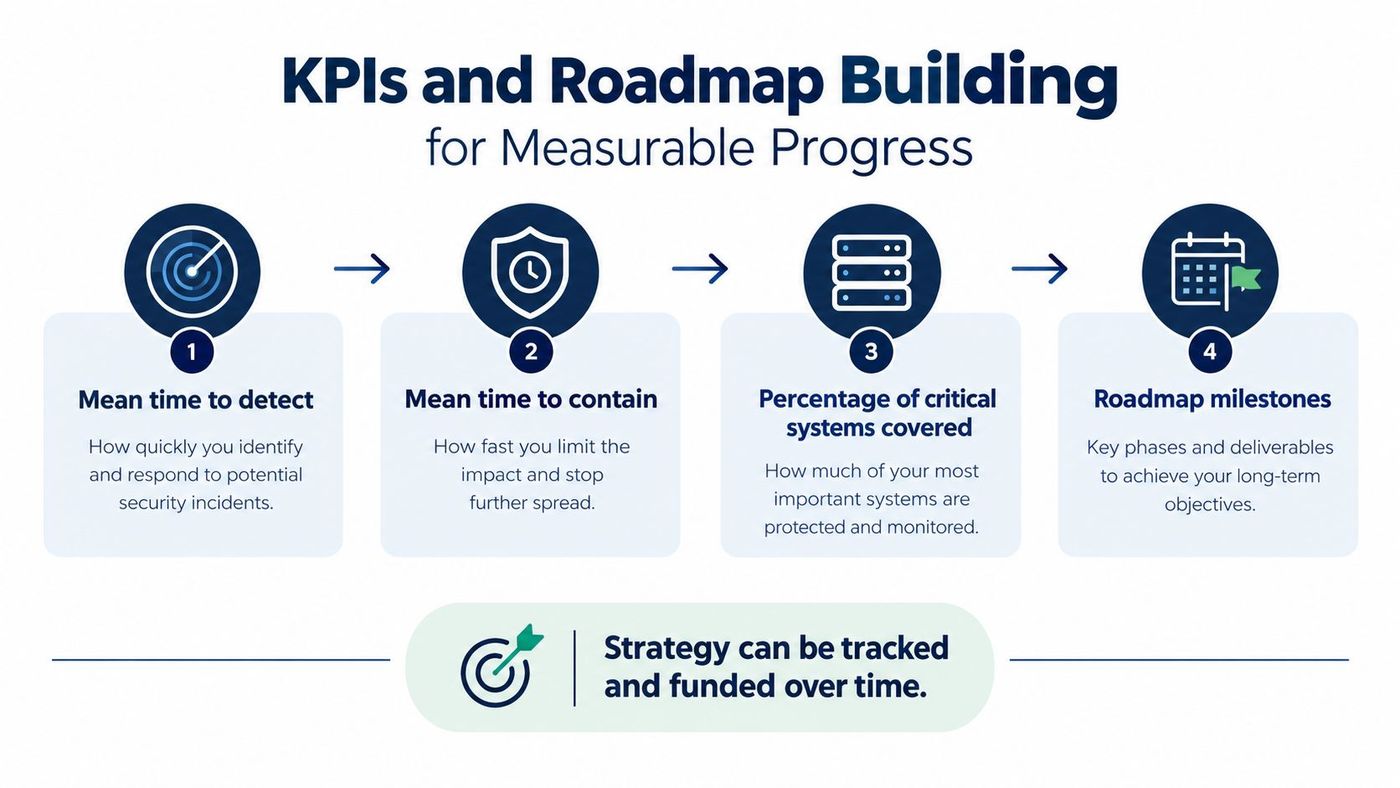
Assess first. Inventory systems, identities, suppliers, and data. Identify the services the business depends on, such as electronic medical records, production systems, dispatch platforms, or financial applications. This tells you what needs protection and where disruption would hurt most.
Set recovery objectives next. Work with each service owner to define a recovery time objective. Then choose backup arrangements and staffing that can meet it. A target is useful only if a restore test shows it is achievable.
Sequence remediation and migration. Address exposed identity and recovery gaps before major application moves. If a fragile system is safer to replace than repair, make that decision explicit in the roadmap and budget.
Review quarterly. Put KPI changes, overdue risks, and upcoming renewals into one concise executive view. Consistent analytics and reporting for IT performance helps keep the review grounded in evidence rather than anecdotes.
Test restoration, not just backup completion. A successful restore is evidence. A green backup icon is only a claim.
Tie each control to a business or recovery objective. Segmentation can limit how far a compromised workstation reaches. Immutable or logically isolated backups can protect recovery from ransomware. Supplier reviews can reduce risk when a vendor account is misused.
That connection turns security spending into a measurable funding case. Show which objective is at risk, what the KPI indicates, and which decision or budget item would address the gap. The result is a roadmap leaders can assess by its effect on business resilience, not by the number of tools purchased.
Staffing is where strategy becomes real. You can assign ownership internally, bring in a vCIO, co-manage with an external team, or outsource most operations under a fully managed model.
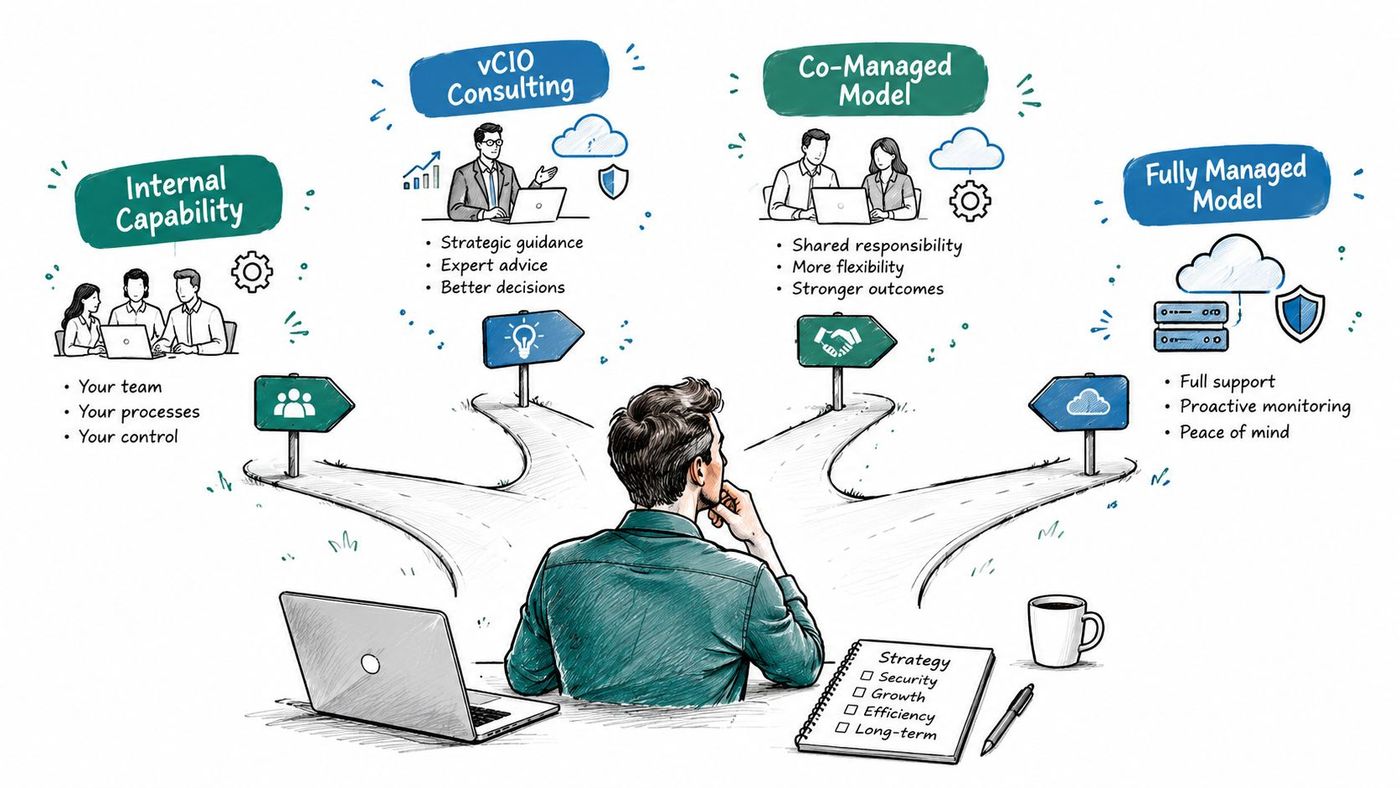
How much risk ownership must stay in house because of regulation, client contracts, or sector knowledge? How much expertise do you already have across cloud, security, networking, and support? How predictable does spending need to be for budgeting?
An internal hire gives you daily presence and business context. The risk is breadth. One person rarely covers strategy, cybersecurity, Microsoft 365, networking, and after hours response equally well.
A vCIO engagement adds planning, budgeting, and governance without a full time executive salary. If you're weighing that route, it helps to compare fractional CIO engagement models by scope, cadence, and decision rights, not by title alone.
Co-managed IT keeps your internal lead in charge of priorities while an external team fills coverage and specialist gaps. Fully managed IT shifts day to day operations out as well, which suits firms with no internal IT staff or leaders who want one accountable provider.
CloudOrbis works within those managed and co-managed models with a 24/7, 100% Canada-based helpdesk, proactive monitoring and maintenance, threat detection, vulnerability assessments, endpoint protection, compliance support, cloud migrations, backup and disaster recovery, business VoIP, and vCIO consulting. Its engagement follows a structured path from assessment and strategy through implementation, employee training, and ongoing optimisation, including a one-click IT Button and Microsoft 365 and Dynamics 365 optimisation.
Treat that as a capability checklist for any provider you assess. Ask who answers after hours, who owns patching evidence, who runs restore tests, and who prepares your quarterly roadmap review.
Sector matters here as well. Clinics need privacy and recovery discipline. Manufacturers and logistics firms need uptime around operational systems and sites. Legal and finance firms need tight document access and client confidentiality. A short guide to fractional IT support models can help you map those needs before interviews.
Don't choose by hourly rate. Choose by accountability. The right model names an owner for strategy, an owner for operations, and a cadence where both report progress to business leaders.
Do one useful thing this quarter. Run a structured assessment before you commit to new spending, and document the systems that would hurt most if they stopped.
That exercise reconnects the three layers. Strategy picks the critical services. Governance assigns owners and objectives. Operations proves controls and restores work.
You'll likely find quick wins. A dormant vendor account gets closed. A backup that looked healthy fails a restore test and gets fixed. A renewal nobody owned gets reviewed before it auto renews.
Start with the systems that carry the business, prove you can recover them, then fund improvements in order of risk.
From there, build the roadmap and KPIs you've just read about into a quarterly rhythm. Keep the first plan short enough that leaders will read it, and specific enough that someone is accountable for every item. Progress you can measure beats ambition you can't staff.
Book a structured IT assessment to map your critical systems, recovery objectives, and supplier risks before your next major purchase. CloudOrbis Inc. offers managed IT, cybersecurity, cloud, and vCIO services for Canadian SMBs, with Canada-based support and quarterly strategic planning built into the relationship. Visit the site to start turning your technology list into a funded, measurable plan.
Book a 30-minute call with a senior engineer. No sales script, just straight answers about your environment.


