7 Cloud Migration Project Examples for SMBs
Explore 7 cloud migration project examples for SMBs, with timelines, migration patterns, budgets, controls, risks, and reusable planning checklists.

Explore 7 cloud migration project examples for SMBs, with timelines, migration patterns, budgets, controls, risks, and reusable planning checklists.

A growing Canadian business often reaches the same uncomfortable point. Staff need reliable access to applications and files from multiple locations, leaders want stronger resilience and security, and finance wants predictable operating costs. Yet the business can't afford a failed cutover, a week of disrupted service, or a migration that creates new compliance problems.
A useful cloud migration project example therefore starts with the workload, not the cloud provider. A clinic handling personal health information has different obligations from a manufacturer connecting production equipment, while a construction firm may need mobile access more than a full data-centre exit. Integration complexity, data sensitivity, connectivity, staff readiness, and recovery requirements all shape the right approach.
The seven examples below compare sector-specific patterns through one practical lens: objectives, assessment findings, migration method, timeline, roles, technology, controls, risks, budget planning, and success measures. They include full workload migrations, business application moves, collaboration platforms, and a focused backup and disaster recovery implementation. The figures and outcomes are planning references, not guarantees. Each organization should validate its own costs, contracts, privacy requirements, dependencies, and baseline performance before approving a project.
An Ontario healthcare network with five clinics has patient information spread across disconnected systems. Clinicians struggle to see a complete record, staff have limited remote access, and the internal team spends too much time maintaining ageing infrastructure. The business objective is not to move servers. It's to give authorized staff a consistent view of patient information while protecting sensitive records and keeping clinic operations running.
The assessment should begin with a data inventory. The project team needs to identify duplicate records, outdated permissions, unsupported integrations, retention obligations, and systems that should not move together. Healthcare leaders, clinical representatives, privacy specialists, and IT administrators should agree on the target Salesforce design before migration work starts.
A phased approach is safer than a single cutover. The network can migrate one clinic at a time, validate workflows with a pilot group, and address authentication, reporting, telehealth, and integration issues before expanding. A six-month planning model may be appropriate for a project of this complexity, but the actual timeline depends on data quality, interfaces, testing capacity, and staff availability.
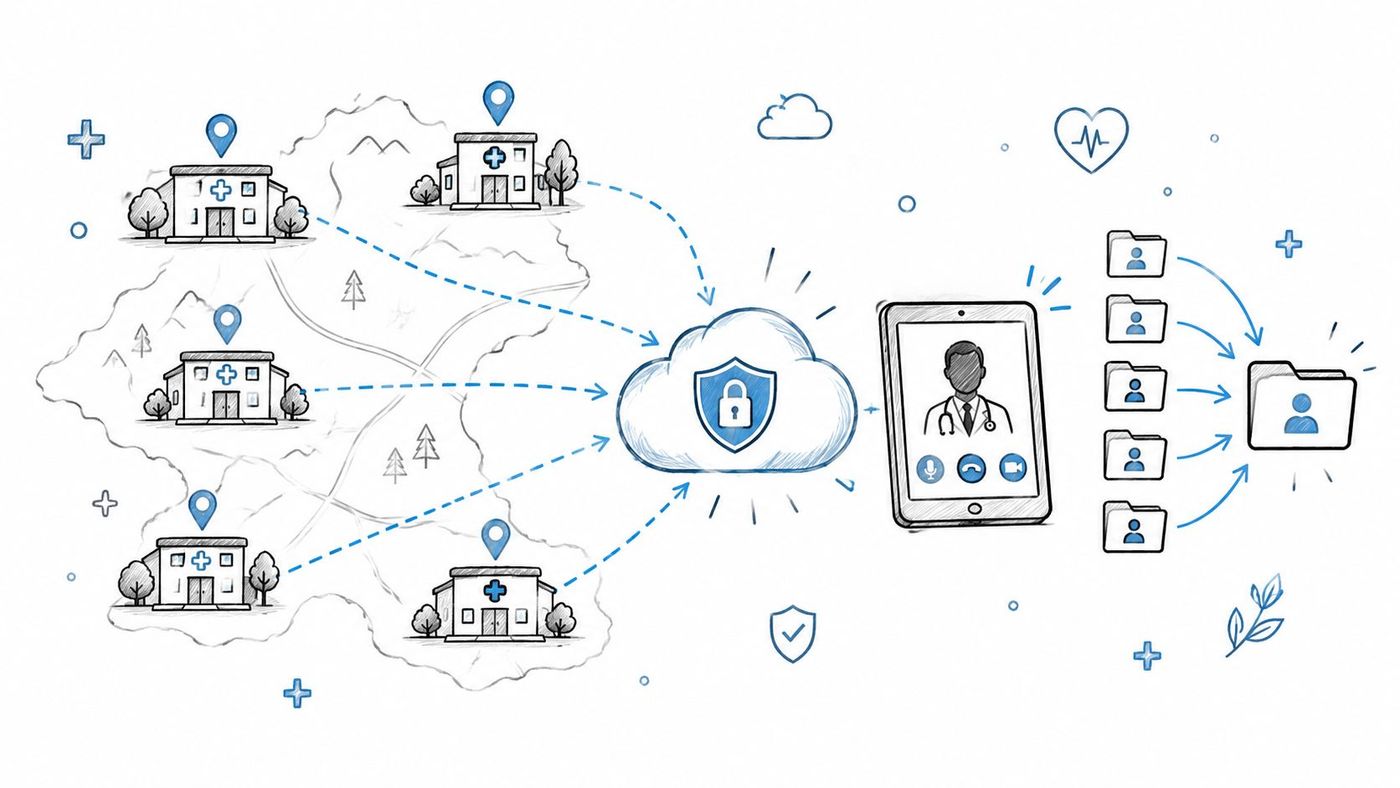
The migration owner should coordinate work across the managed service provider, clinic operations, Salesforce administrators, privacy advisers, and clinical champions. Staff training must cover both the software and the workflow changes, including how users locate records, document care, request access, and respond when a service is unavailable.
Before go-live, the team should validate:
Canadian organizations should also distinguish data residency from data sovereignty. Storing information in Canada doesn't automatically answer who may access it under foreign jurisdiction or through a provider's support chain. The Government of Canada's guidance on data sovereignty in the public cloud recommends assessing residency, access, security, and jurisdictional risks.
The budget should include discovery, data cleanup, integration work, licensing, training, privacy review, support, and post-cutover monitoring. For healthcare organizations evaluating managed IT services for healthcare, the reusable lesson is clear: migrate the patient workflow in controlled waves, and treat privacy and recovery evidence as release criteria rather than paperwork added at the end.
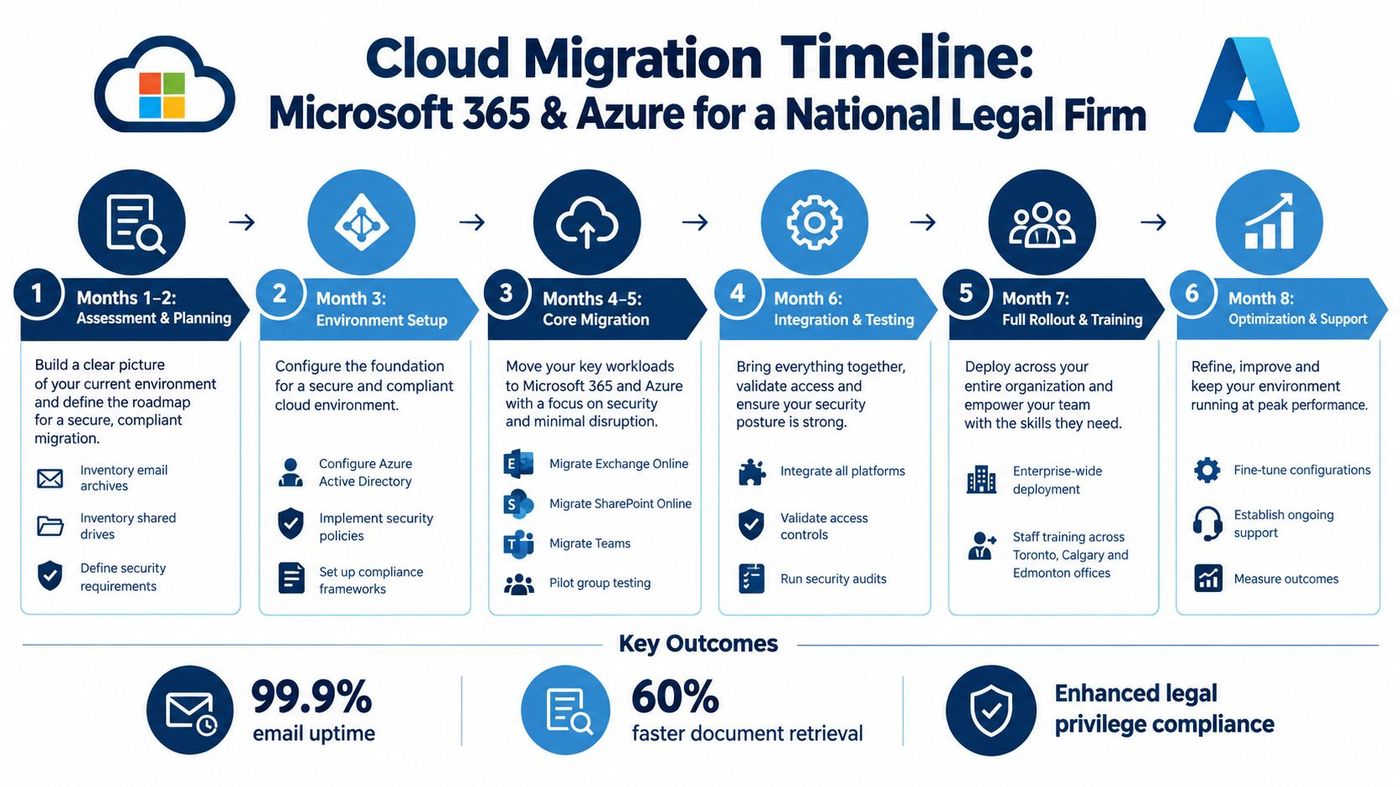
A 200-person legal firm with offices in Toronto, Calgary, and Edmonton relies on traditional email servers and shared file systems. Lawyers need secure access to matter files across offices, but unrestricted collaboration could expose privileged information. The business case combines mobility, document control, identity management, and stronger protection for client communications.
The migration target uses Exchange Online for email, SharePoint Online for document management, Teams for collaboration, and Azure Active Directory for identity. The important design choice is not the product list. It's the governance model that determines how matters are created, who can access them, how external sharing works, and when records must be retained or disposed of.
The first assessment should catalogue mailboxes, archives, shared drives, matter folders, user identities, guest accounts, and existing permissions. Legal teams often inherit years of inconsistent folder structures. Moving that disorder into SharePoint can make search and collaboration worse, not better.
A pilot with a small group of lawyers and support staff should test migration tooling, document permissions, Teams templates, search, mobile access, and matter-opening procedures. The broader rollout can then proceed over an eight-month planning horizon, provided the firm has enough time for validation and training.
Key controls include:
A legal firm should also plan for user behaviour. Lawyers may continue using local copies, personal storage, or email attachments if the new structure feels slower. Matter leaders and practice-group champions can test templates and explain why the new process protects both productivity and privilege.
The budget model needs to include Microsoft licensing, migration services, archive remediation, security configuration, records-management design, training, support, and ongoing administration. A project that only funds mailbox transfer will leave the firm with an expensive platform and weak governance.
The IT support approach for legal firms should therefore be evaluated against operational needs, not just helpdesk response. Success measures can include migration exceptions, permission-review completion, search usability, authentication failures, policy violations, and user adoption. The firm should measure whether staff can find and share the right document with the right people, not merely whether accounts were moved.
For a manufacturer with facilities in Ontario and Quebec, the ERP is part of the production system. It connects inventory, purchasing, scheduling, suppliers, finance, and plant operations. A cloud migration that ignores equipment connectivity or production dependencies can create downtime at the exact moment the business expects modernization to improve reliability.
The target environment is cloud-based SAP S/4HANA. The assessment should map master data, plant systems, warehouse processes, supplier interfaces, production equipment, reporting, and customizations. Representatives from production, supply chain, finance, IT, quality, and plant maintenance need decision rights because each group sees different failure modes.
The safest pattern is a staged implementation. Start with a low-impact department or process, validate data and integrations, then expand to more critical operations. The team should schedule the production cutover during planned downtime and maintain a tested rollback path until transaction reconciliation is complete.
The project can use a ten-month planning model, but the schedule must follow data cleansing, interface testing, training, and plant readiness rather than an arbitrary cloud deadline. A dedicated project team should own the integrated plan, while plant leaders approve operational cutover criteria.
Important controls include:
A manufacturer should resist the temptation to customize every legacy process in the new platform. Some redesign is useful, but uncontrolled customization increases testing effort, support burden, and future upgrade friction. The migration budget should cover integration engineering, data remediation, plant connectivity, specialist SAP skills, change management, training, downtime planning, and post-go-live support.
The IT solutions for manufacturing companies should be assessed against production realities, including maintenance windows and plant-floor support. Teams interested in real-world AI in factories should also stabilize the underlying data and integration architecture first. Advanced analytics can't compensate for unreliable master data or disconnected production systems.
Practical rule: Don't approve the cutover because the application starts. Approve it when production transactions, interfaces, security controls, recovery procedures, and business workarounds have all passed their tests.
Not every cloud project requires a full workload migration. A regional hospital network with three facilities may keep core applications on premises while replacing ageing tape-based backups with cloud-based protection. This is a focused backup and disaster recovery implementation, not a general move of every system into the cloud.
The hospital's problem is resilience. Recovery takes too long, backup jobs are difficult to verify, and patient-data protection requirements are hard to evidence. The proposed design uses continuous replication to Azure storage, automated daily backups with 30-day retention, documented recovery procedures, and quarterly recovery testing.
The stated recovery targets are an RTO of four hours, reduced from more than 24 hours, and an RPO of one hour. Those figures belong to this planning example and should not be treated as a universal healthcare standard. A provider must set targets by application, clinical impact, acceptable data loss, connectivity, and available recovery capacity.
The project owner should build an inventory of every critical application, database, server, interface, and dependency. Backup alerts need named owners and escalation paths. Internet bandwidth must support replication without degrading clinical systems, and the recovery environment must be sized for the workloads that need to run during an outage.
Quarterly tests should document:
PHIPA considerations should shape the architecture, contracts, access controls, logging, encryption, retention, and test evidence. Teams should document who can initiate recovery, who approves emergency access, and how the hospital communicates during an outage. A backup platform without a rehearsed operating procedure leaves the organization dependent on a vendor console when pressure is highest.
The budget is usually different from a full migration budget. It should cover protected storage, replication bandwidth, backup licensing, recovery capacity, implementation, monitoring, testing, documentation, and support. The right success measures are restored applications, validated data, tested procedures, alert response, and recovery performance.
A healthcare disaster recovery plan should make recovery executable by an on-call team, not just understandable to the person who designed it. The reusable lesson is to separate the resilience decision from the broader cloud strategy. A focused project can reduce a major risk even when the organization isn't ready to migrate its core applications.
A boutique investment management firm handling client portfolios needs more than scalable infrastructure. Its trading platform, portfolio management system, client communications, regulatory reporting, and audit evidence must work together under strict security and compliance requirements.
The migration target includes encrypted client portals, multifactor authentication, real-time audit logging, and compliance monitoring dashboards. A 12-month migration model gives the firm time to assess applications, validate controls, test integrations, and move workloads in waves. The compliance review committee should participate from the start, not only sign off before launch.
The assessment should classify client data, map every access path, identify regulatory reporting dependencies, and document where logs are generated, stored, reviewed, and retained. External compliance auditors can challenge assumptions about privileged access, encryption keys, incident response, vendor responsibilities, and cross-border processing.
A strong operating model assigns named owners for:
The firm should avoid treating a compliance dashboard as proof of compliance. Dashboards show conditions. People still need to review alerts, investigate anomalies, remediate gaps, approve exceptions, and retain evidence for regulatory inquiries.
Budget planning should include architecture, security tooling, logging storage, penetration testing, compliance consulting, migration specialists, training, and ongoing monitoring. Operational costs may change after migration, so finance should compare the pre-migration baseline with the full cost of cloud services, licenses, support, audits, and control operation.
The SOC 2 certification context in Canada can help teams understand how independent assurance differs from a complete internal compliance program. A firm should select controls based on its actual obligations and risk profile rather than pursuing a certification label as a substitute for secure design.
Success means that authorized staff can work reliably, security teams can detect and investigate access, auditors can trace decisions, and the organization can demonstrate how its controls operate. Cloud infrastructure becomes useful when it makes those responsibilities more visible and repeatable.
A national logistics provider with distribution centres across Canada has a different migration priority from a professional services firm. Its warehouse management system, transportation management system, GPS tracking, inventory records, driver workflows, and customer portal must exchange timely information across locations with uneven connectivity.
The project consolidates warehouse and transportation data in cloud platforms, integrates real-time tracking, automates route planning, and gives customers self-service shipment visibility. A nine-month migration model may work for a phased rollout, beginning with the highest-volume distribution centres and expanding after operational validation.
The first assessment should document current workflows, device coverage, cellular availability, legacy interfaces, warehouse processes, route-planning rules, and customer-service handoffs. Teams should identify where manual rekeying creates errors and where a cloud integration could make an outage more widespread if dependencies aren't designed properly.
The rollout needs participation from warehouse supervisors, dispatchers, drivers, customer service, IT, finance, and regional operations. Training can't stop at a web demonstration. Drivers and warehouse staff need practice with mobile applications, exception handling, offline procedures, device replacement, and escalation during connectivity failures.
Useful controls include:
Cloud software won't automatically improve routing. Poor address data, unrealistic delivery windows, incomplete vehicle constraints, or unmonitored algorithm changes can produce technically valid but operationally poor decisions. The logistics team should review route outcomes continuously and give dispatchers authority to override recommendations when circumstances require it.
Budget planning should include platform subscriptions, GPS and scanner integration, cellular coverage, device refreshes, data cleansing, training, customer-portal work, support, and regional rollout costs. The business should compare full operating costs against the current environment, including manual administration and customer-service effort.
The practical outcome is a connected operating model, but only if the provider treats field conditions as part of the architecture. A cloud platform that works in the head office and fails in a remote delivery region isn't a successful migration.
A construction company managing several Ontario projects uses email, spreadsheets, local document folders, and informal updates from job sites. Project managers struggle with version control, budget visibility, delayed approvals, and inconsistent communication. Field staff need current drawings, schedules, and instructions without returning to the office.
This example is a focused application and collaboration migration. The company doesn't need to move every server immediately. It needs a controlled cloud platform for project management, document collaboration, cost tracking, mobile access, and alerts.
The best starting point is one pilot project with a cooperative project manager and representative document, budget, subcontractor, and field workflows. The team can define naming standards, permissions, approval routes, revision control, mobile procedures, and reporting before rolling the model across the portfolio.
The implementation owner should include project executives, site supervisors, estimators, finance, IT, and field users. Training needs to cover mobile access, offline conditions, document review, issue assignment, time tracking, and escalation. New employees also need a repeatable onboarding process because project teams change frequently.
The platform should support:
Construction leaders should be cautious about measuring success through login counts alone. Better indicators include time spent locating the current document, unresolved approval age, budget-variance response, field-report completion, rework causes, and stakeholder communication quality.
The budget should include platform licensing, document migration, configuration, mobile devices where needed, training, support, integration with accounting or time-tracking systems, and ongoing administration. A low-cost implementation that leaves project managers maintaining parallel spreadsheets may create more work rather than less.
The migration works when project standards become easier to follow than informal workarounds. It doesn't work when the company launches a platform without deciding who owns documents, who approves changes, how records are retained, and what happens when a site loses connectivity.
| Project | Sector | Implementation complexity | Resource requirements | Expected outcomes / Key benefits | Ideal use cases |
|---|---|---|---|---|---|
| Salesforce Cloud Migration for a Mid-Sized Healthcare Clinic Network | Healthcare | Moderate, phased 6‑month migration with HIPAA requirements and staff change management | Managed IT partner, compliance specialists, staff training, secure cloud architecture, internet connectivity | 40% IT cost reduction; centralized patient records; secure telehealth; stronger compliance | Multi‑location clinics needing data consolidation and telehealth enablement |
| Microsoft 365 and Azure Migration for a National Legal Firm | Legal | Moderate‑high, 8 months with legacy archive migration and governance setup | Microsoft 365/Azure licenses, migration tools, training, identity and security configuration | 99.9% email uptime; 60% faster document retrieval; improved collaboration and compliance controls | Multi‑office professional services requiring secure document collaboration and email reliability |
| Manufacturing ERP System Cloud Migration with Supply Chain Integration | Manufacturing | High, 10 months, complex ERP (S/4HANA) integrations and extensive data cleansing | ERP cloud licensing, integration development, cross‑functional project team, data cleansing effort | 70% reduction in downtime; 25% lower inventory holding costs; 40% faster order fulfillment | Multi‑facility manufacturers needing real‑time inventory, production scheduling and supplier integration |
| Healthcare Data Backup and Disaster Recovery Cloud Implementation | Healthcare | Low‑moderate, focused DR project with continuous replication and regular testing | Cloud storage (Azure), high bandwidth, IT expertise for setup/testing, documented recovery procedures | RTO 4 hours (from 24+); RPO 1 hour; improved compliance and faster recovery | Hospitals and health networks replacing tape backups to meet PHIPA/HIPAA recovery and compliance goals |
| Financial Services Cloud Infrastructure Migration with Regulatory Compliance | Financial Services | High, 12 months with strict regulatory approvals and validation requirements | Secure cloud in Canadian data centers, compliance auditors, advanced logging, MFA and monitoring | 35% infrastructure cost reduction; 100% client portal uptime; full regulatory compliance | Investment managers and firms with stringent securities and privacy regulations (PIPEDA) |
| Logistics and Supply Chain Network Cloud Transformation | Logistics | Moderate‑high, 9 months with hardware and legacy system integrations | WMS/TMS cloud platforms, GPS/tracking devices, fleet upgrades, integration and driver training | 35% lower transportation costs; 98% on‑time delivery; 60% fewer visibility inquiries | National logistics and distribution networks needing real‑time tracking and route optimization |
| Construction Company Project Management and Collaboration Cloud Implementation | Construction | Moderate, platform rollout with mobile field adoption and document migration | Project management SaaS, mobile apps, document migration, staff and field training | 25% reduction in project delays; improved budget control; better stakeholder communication | Multi‑project construction firms seeking centralized documentation and real‑time field updates |
These examples share a pattern. Successful cloud projects start with an inventory of applications, data, identities, interfaces, devices, contracts, and operational dependencies. They define an outcome that matters to the business, such as safer recovery, faster access to matter files, better production visibility, or more consistent field collaboration.
They also avoid the assumption that every workload should use the same migration method. A collaboration platform may be configured and adopted in waves. An ERP may require data cleansing, integration testing, and a planned production window. A hospital may gain more immediate value by improving backup and recovery while leaving core systems where they are.
Canada's broader adoption trend provides useful context. Statistics Canada reported that cloud use among Canadian businesses rose from 39% in 2019 to 45% in 2021, while average annual cloud spending among businesses using cloud services rose from approximately C$28,000 to C$43,000 over the same period. The Statistics Canada 2021 release also reported average spending of C$558,000 for large businesses, C$44,000 for medium-sized businesses, and C$8,800 for small businesses. Those figures are historical benchmarks, not quotes for your project.
Adoption continued to 48% in 2023, up from 45% in 2021, and reached 81% in the information and cultural industries, according to Statistics Canada's 2023 survey release. The figures show that cloud use is mainstreaming, but they don't prove that a full migration is right for every organization. Your workload mix, controls, staffing, contracts, and recovery needs still determine the business case.
A reusable migration brief should contain these fields:
A public-sector consolidation example shows why governance must scale with the portfolio. Shared Services Canada coordinated 26 federal departments and agencies, migrated more than 2,300 virtual servers and 150 physical servers, and moved over 3 petabytes of data while closing the aging Airport Parkway Data Centre, as described in the documented consolidation example. The useful lesson for an SMB isn't the scale. It's the discipline of inventory, ownership, dependency mapping, standardized controls, validation, and verified retirement.
Performance testing also needs to use real workflows. During York University's Canadian eClass migration to AWS Canada, independent reporting recorded an average page-load time of 0.66 seconds, nearly half the previous result, after simulations of expected Moodle activity. York's documentation records the move to a fully managed AWS Canada environment in December 2021, while the York eClass migration case study describes the testing approach. For another organization, the right acceptance criteria may be p95 latency, login success, transaction errors, restore duration, or failover recovery time.
Accessibility belongs in the delivery plan too. Ontario organizations with 50 or more employees have had to meet WCAG 2.0 Level AA requirements for public websites and web content since January 1, 2021, subject to specified exceptions, under the Accessibility for Ontarians with Disabilities Act guidance. Migration content, diagrams, forms, and case studies should therefore be usable by people relying on assistive technology.
Every visual needs a meaningful alternative. Government guidance recommends captions or alt text that convey an image's meaning and context, along with captions and transcripts for video and audio. The Government of Canada accessibility guidance explains these mechanics, while its alternate-format guidance emphasizes that images should enhance information already available in text.
Use the closest example as a starting point, then test its assumptions against your own environment. CloudOrbis can help organizations assess workloads, plan migration waves, configure security, prepare users, implement backup and disaster recovery, and manage the environment after cutover. A structured assessment is more useful than choosing a platform first and discovering the business constraints later.
CloudOrbis Inc. provides managed IT support, cloud migration, cybersecurity, backup and disaster recovery, and strategic IT consulting for Canadian small and mid-sized businesses. Visit CloudOrbis Inc. to discuss your workload inventory, migration roadmap, compliance controls, and post-migration support needs.
Book a 30-minute call with a senior engineer. No sales script, just straight answers about your environment.


